


Page 624 - Subyek Computer Aided Design - [David Planchard] Engineering Design with SOLIDWORKS
P. 624
Top-Down and Sheet Metal Parts                                                                                                                             Engineering Design with SOLIDWORKS® 2018


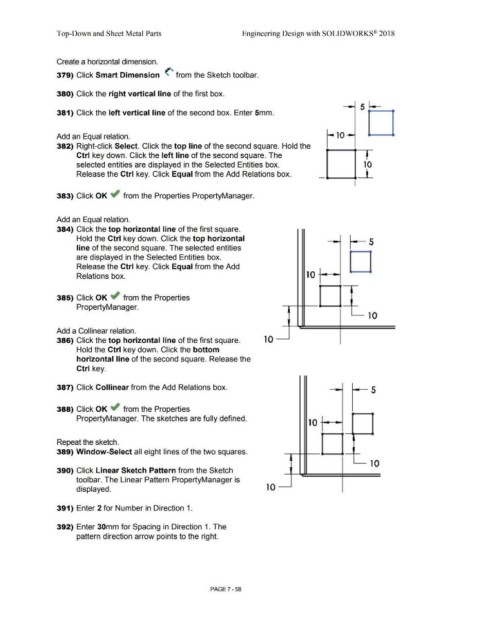
                                                Create a horizontal dimension.


                                                379) Click Smart Dimension <' from the Sketch toolbar.


                                                380) Click the right vertical line of the first box.


                                                381) Click the left vertical line of the second box. Enter 5mm.


                                                Add an Equal relation.


                                                382) Right-click Select. Click the top line of the second square. Hold the


                                                                 Ctrl key down. Click the left line of the second square. The


                                                                 selected entities are displayed in the Selected Entities box.                                                                                                                                                                             ' 10


                                                                 Release the Ctrl key. Click Equal from the Add Relations box.                                                                                                                                                   .,__..,._L


                                                                                                                                                                                                                                                                                                         I


                                                383) Click OK ~ from the Properties PropertyManager.


                                                Add an Equal relation.


                                                384) Click the top horizontal line of the first square.


                                                                 Hold the Ctrl key down. Click the top horizontal
                                                                                                                                                                                                                                                                                                                    5


                                                                 line of the second square. The selected entities


                                                                 are displayed in the Selected Entities box.


                                                                 Release the Ctrl key. Click Equal from the Add


                                                                 Relations box.                                                                                                                                                                                  10


                                                385) Click OK ~ from the Properties


                                                                 PropertyManager.


                                                                                                                                                                                                                                                                                                                    10


                                                Add a Collinear relation.


                                                386) Click the top horizontal line of the first square.                                                                                                                      10


                                                                 Hold the Ctrl key down. Click the bottom


                                                                 horizontal line of the second square. Release the


                                                                 Ctrl key.


                                                387) Click Collinear from the Add Relations box.                                                                                                                                                                                                                      5


                                                388) Click OK ~ from the Properties


                                                                 PropertyManager. The sketches are fully defined.
                                                                                                                                                                                                                                                                  10


                                                Repeat the sketch.


                                                389) Window-Select all eight lines of the two squares.


                                                                                                                                                                                                                                                                                                                      10


                                                390) Click Linear Sketch Pattern from the Sketch


                                                                toolbar. The Linear Pattern PropertyManager is


                                                                 displayed.                                                                                                                                                    10


                                                391) Enter 2 for Number in Direction 1.


                                                392) Enter 30mm for Spacing in Direction 1. The


                                                                 pattern direction arrow points to the right.


                                                                                                                                                                                PAGE? - 58

