Page 620 - Subyek Computer Aided Design - [David Planchard] Engineering Design with SOLIDWORKS
P. 620
Top-Down and Sheet Metal Parts                                                                                                                             Engineering Design with SOLIDWORKS® 2018


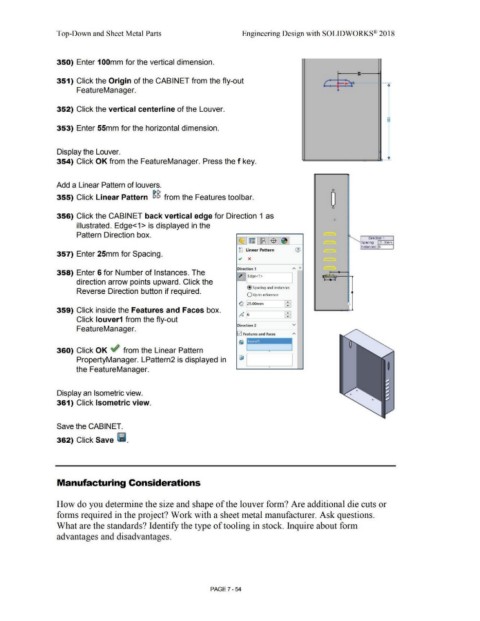
                                                350) Enter 100mm for the vertical dimension.


                                                                                                                                                                                                                                                                                                           8:

                                                351) Click the Origin of the CABINET from the fly-out                                                                                                                                                                          f                   , _                              G-


                                                                 FeatureManager.                                                                                                                                                                                                           ~


                                                352) Click the vertical centerline of the Louver.

                                                                                                                                                                                                                                                                                                                                    -


                                                                                                                                                                                                                                                                                                                                    8

                                                353) Enter 55mm for the horizontal dimension.


                                                Display the Louver.


                                                354) Click OK from the FeatureManager. Press the f key.


                                                Add a Linear Pattern of louvers.


                                                                                                                                [)C,                                                                                                                                                  0
                                                                                                                                                                                                                                                                                     0
                                                355) Click Linear Pattern  eiei  from the Features toolbar.


                                                                                                                                                                                                                                                                                      0


                                                356) Click the CABINET back vertical edge for Direction 1 as


                                                                 illustrated. Edge<1 > is displayed in the


                                                                 Pattern Direction box.
                                                                                                                                                                                                                                                                                                                     Direction 1
                                                                                                                                                                                                                                                                                                                            ,;;.--------1
                                                                                                                                                                                                                                                                                                              Spacing:  25.00rnrn

                                                                                                                                                                                                                                                                                                              Instances:  6
                                                                                                                                                                                                        gg Linear Pattern
                                                357) Enter 25mm for Spacing.
                                                                                                                                                                                                        .;  x


                                                                                                                                                                                                       Direction 1                                   ""  "
                                                358) Enter 6 for Number of Instances. The

                                                                                                                                                                                                      Z]~Edge<l>
                                                                 direction arrow points upward. Click the


                                                                                                                                                                                                               @ Spacing and instances
                                                                 Reverse Direction button if required.                                                                                                                                                                                                •

                                                                                                                                                                                                               O Up to reference


                                                                                                                                                                                                        G  25.00mm
                                                359) Click inside the Features and Faces box.                                                                                                              0

                                                                                                                                                                                                        o"~  6                                 - •
                                                                                                                                                                                                                                                •
                                                                 Click louver1 from the fly-out


                                                                                                                                                                                                       Direction 2                                   v
                                                                 FeatureManager.

                                                                                                                                                                                                      !v'! Features and Faces


                                                360) Click OK ~ from the Linear Pattern                                                                                                                                          •


                                                                 PropertyManager. LPattern2 is displayed in


                                                                the FeatureManager.                                                                                                                                                                                                                                                 I


                                                Display an Isometric view.


                                                361) Click Isometric view.


                                                Save the CABINET.


                                                362) Click Save Ii.


                                                Manufacturing Considerations


                                                How do you determine the size and shape of the louver form? Are additional die cuts or


                                                forms required in the project? Work with a sheet metal manufacturer. Ask questions.


                                                What are the standards? Identify the type of tooling in stock. Inquire about form


                                                advantages and disadvantages.


                                                                                                                                                                                PAGE? - 54
   615   616   617   618   619   620   621   622   623   624   625