


Page 616 - Subyek Computer Aided Design - [David Planchard] Engineering Design with SOLIDWORKS
P. 616
Top-Down and Sheet Metal Parts Engineering Design with SOLIDWORKS® 2018
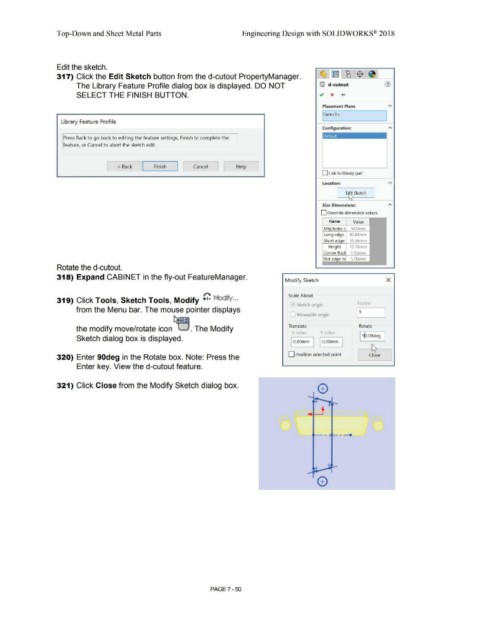
Edit the sketch.
317) Click the Edit Sketch button from the d-cutout PropertyManager. ~-l ~ L~_[ $ [ ~I
The Library Feature Profile dialog box is displayed. DO NOT ®) d-cutout (J)
SELECT THE FINISH BUTTON.
Placement Plane
I
1Face<1 >
Library Feature Profile
Configuration:
Press Back to go back to editing the feature settings, Finish to complete the loefault
'eature, or Cancel to abort the sketch edit.
~ Cancel J -
L < Back - ~-F_in_ish_~ Help
-
D Link to library part
Location:
~ ..... E~ Sketch
Size Dimensions:
D Override dimension values
Name Value
Mt holes c 50.8mm
40.64mm
35.56mm
Hei ht 10.16mm
Corner Radi 1 .52mm
Slot ed e to 5.08mm
Rotate the d-cutout.
318) Expand CABINET in the fly-out FeatureManager.
Modify Sketch x
Scale About
319) Click Tools, Sketch Tools, Modify G Modify ...
A Sketch origin Factor:
from the Menu bar. The mouse pointer displays 1,
l Moveable origin
Translate Rotate
the modify move/rotate icon . The Modify
X value Y valuP
Sketch dialog box is displayed. I 9p.00deg
I O.OOmm I O.OOmm
~
320) Enter 90deg in the Rotate box. Note: Press the D Position selected point [ Close l
Enter key. View the d-cutout feature.
321) Click Close from the Modify Sketch dialog box.
0
~, ,-- - .
0
PAGE ? - 50

