


Page 615 - Subyek Computer Aided Design - [David Planchard] Engineering Design with SOLIDWORKS
P. 615
Engineering Design with SOLIDWORKS® 2018 Top-Down and Sheet Metal Parts
CABINET-Sheetmetal Design Library Feature
Sheet metal manufacturers utilize dies and forms to create specialty cuts and shapes. The
Design Library contains information on dies and forms. The Design Library, features
folder contains examples of predefined sheet metal shapes. Insert a die cut on the right
wall of the CABINET. The die cut is for a data cable. The team will discuss sealing
issues at a later date.
Activity: CABINET-Sheetmetal Design Library Feature
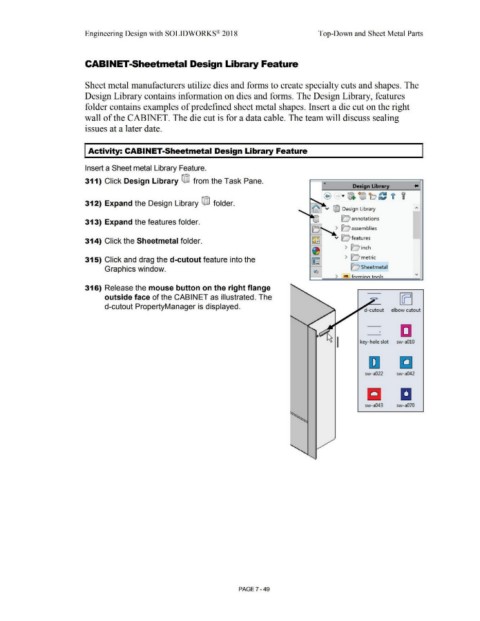
Insert a Sheet metal Library Feature.
311) Click Design Library ®J from the Task Pane. « ....
Design Library
@ ... t1)}. '®) b ~ i f
r-,,......
312) Expand the Design Library ®J folder.
.,~ r,
~ ~ v @ Design Library
313) Expand the features folder. w O annotations
oN ~ assemblies
l2S~ v O features
314) Click the Sheetmetal folder.
~ > lcJ inch
315) Click and drag the d-cutout feature into the > le;' metric
~ -
Graphics window. 1;i!;J D Sheetmetal ..,,
> Pl!! ioJ:m in .n to.oJs
316) Release the mouse button on the right flange
outside face of the CABINET as illustrated. The
d-cutout PropertyManager is displayed.
elbow cut out
CJ
key-hole slot sw-a010
D Cl
sw-a022 sw-a042
1:1 a
sw-a043 sw-a070
PAGE ? - 49

