


Page 612 - Subyek Computer Aided Design - [David Planchard] Engineering Design with SOLIDWORKS
P. 612
Top-Down and Sheet Metal Parts Engineering Design with SOLIDWORKS® 2018
Holes should be of equal size and utilize common fasteners. Why? You need to ensure a
cost effect design that is price competitive. Your company must be profitable with their
designs to ensure financial stability and future growth.
Another important reason for fastener commonality and simplicity is the customer. The
customer or service engineer does not want to supply a variety of tools for different
fasteners.
A designer needs to be prepared for changes. You proposed two fasteners. Ask
Purchasing to verify availability of each fastener. Select a 05.0mm hole and wait for a
return phone call from the Purchasing department to confirm. Design flexibility is key!
, 1 /
;Q~ Dimension the hole position. Do not dimension to sheet metal bends. If the sheet
metal manufacturer modifies the bend radius, the hole position does not maintain the
design intent. Reference the hole dimension by selecting the Origin in the
F eatureManager.
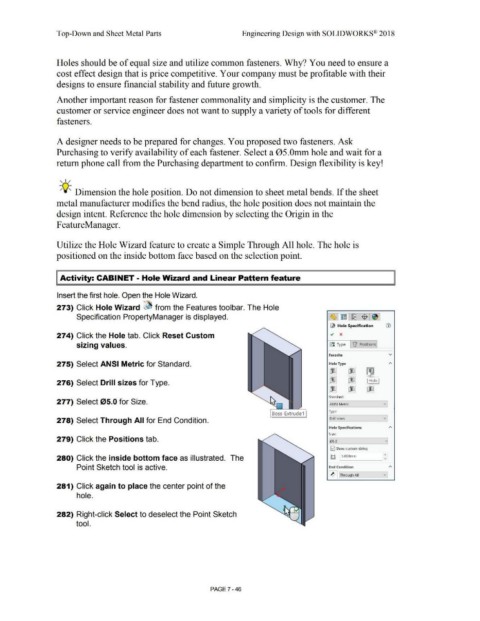
Utilize the Hole Wizard feature to create a Simple Through All hole. The hole is
positioned on the inside bottom face based on the selection point.
Activity: CABINET - Hole Wizard and Linear Pattern feature
Insert the first hole. Open the Hole Wizard.
273) Click Hole Wizard ~ from the Features toolbar. The Hole
Specification PropertyManager is displayed. c'.& I trn L~ I $ J ~ I
~ Hole Specification (j)
274) Click the Hole tab. Click Reset Custom ~ x
jsJ Type J 1? Positions I
sizing values.
Favorite v
275) Select ANSI Metric for Standard. Hole Type A
00 00 • ,,.
I J
I
m m Hole
276) Select Drill sizes for Type.
00 (00] [00
Standard:
277) Select 05.0 for Size. ANSI Metric v
[soss-Extrude1 I Type:
278) Select Through All for End Condition. Drill sizes v
Hole Specifications A
Size:
279) Click the Positions tab. 05.0 v
E2J Show custom sizing
280) Click the inside bottom face as illustrated. The ltj J S.OOOmm J:
Point Sketch tool is active. End Condition A
~ Through All v
281) Click again to place the center point of the
hole.
282) Right-click Select to deselect the Point Sketch
tool.
PAGE 7 - 46

