Page 608 - Subyek Computer Aided Design - [David Planchard] Engineering Design with SOLIDWORKS
P. 608
Top-Down and Sheet Metal Parts                                                                                                                             Engineering Design with SOLIDWORKS® 2018


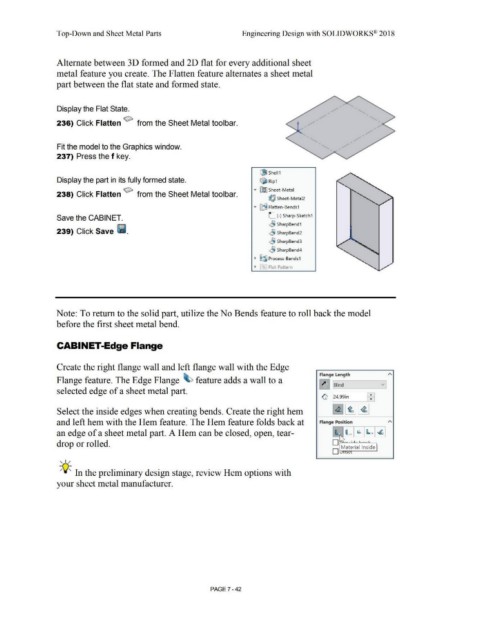
                                                Alternate between 30 formed and 2D flat for every additional sheet


                                                metal feature you create. The Flatten feature alternates a sheet metal


                                                part between the flat state and formed state.


                                                Display the Flat State.


                                                236) Click Flatten ~ from the Sheet Metal toolbar.


                                                Fit the model to the Graphics window.


                                                237) Press the f key.


                                                                                                                                                                                                                          i!J Shell1

                                                Display the part in its fully formed state.                                                                                                                               ~      Rip1


                                                                                                                                                                                                                    •  ~ Sheet-Metal
                                                238) Click Flatten ~ from the Sheet Metal toolbar.
                                                                                                                                                                                                                                 ~ Sheet-Metal2


                                                                                                                                                                                                                                 .-
                                                                                                                                                                                                                     ..,.  [1i  Flatten-Bends1


                                                Save the CABINET.                                                                                                                                                                L  (-) Sharp-Sketch1


                                                                                                                                                                                                                                 ~ SharpBend 1
                                                239) Click Save 111.                                                                                                                                                             ~ SharpBend2


                                                                                                                                                                                                                                 ,.9 Sharp8end3


                                                                                                                                                                                                                                 ..§j SharpBend4


                                                                                                                                                                                                                     •  ~~ Process-Bends1


                                                                                                                                                                                                                     •  ~· Flat-Pattern


                                                Note: To return to the solid part, utilize the No Bends feature to roll back the model


                                                before the first sheet metal bend.


                                                CABINET-Edge Flange


                                                Create the right flange wall and left flange wall with the Edge


                                                                                                                                                                                                                                                                            Flange Length                                           "'
                                                Flange feature. The Edge Flange  ~ feature adds a wall to a


                                                                                                                                                                                                                                                                           ~ Blind                                             v
                                                selected edge of a sheet metal part.

                                                                                                                                                                                                                                                                             ~                                     ~: I
                                                                                                                                                                                                                                                                                      124.99in


                                                Select the inside edges when creating bends. Create the right hem                                                                                                                                                                     ~ ~ ~


                                                and left hem with the Hem feature. The Hem feature folds back at                                                                                                                                                            Flange Position                                         "'


                                                an edge of a sheet metal part. A Hem can be closed, open, tear-                                                                                                                                                                         !lr- b             ~       ~  ~

                                                                                                                                                                                                                                                                                      o rit  -··-·  .

                                                drop or rolled.
                                                                                                                                                                                                                                                                                      D Material Inside

                                                                                                                                                                                                                                                                                             J I '

                                                   , ,/


                                                  -;Q~ In the preliminary design stage, review Hem options with


                                                your sheet metal manufacturer.


                                                                                                                                                                                PAGE 7 - 42
   603   604   605   606   607   608   609   610   611   612   613