Page 605 - Subyek Computer Aided Design - [David Planchard] Engineering Design with SOLIDWORKS
P. 605
Engineering Design with SOLIDWORKS® 2018                                                                                                                                                          Top-Down and Sheet Metal Parts


                                                                        Extrude the sketch.


                                                                        203) Click Extruded Boss/Base  ~ from the Features toolbar. The


                                                                                        Boss-Extrude PropertyManager is displayed.


                                                                        204) Enter 1 OOmm for Depth in Direction 1. Accept the default settings.


                                                                        205) Click OK ~ from the Boss-Extrude PropertyManager.


                                                                        Return to the BOX assembly.


                                                                        206) Click Edit Component  ~ from the Assembly toolbar.


                                                                        Rename the default component [Part3"BOX]<1 > to CABINET.


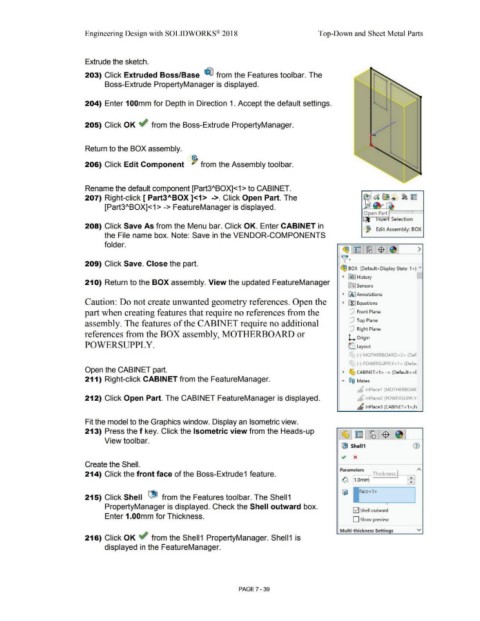
                                                                        207) Right-click [ Part3ABOX ]<1>  ->. Click Open Part. The


                                                                                        [Part3"BOX]<1 > -> FeatureManager is displayed.
                                                                                                                                                                                                                                                                                                                 Open P~a~rt ~ ===i==I


                                                                                                                                                                                                                                                                                                                            n~e  Selection

                                                                        208) Click Save As from the Menu bar. Click OK. Enter CABINET in
                                                                                                                                                                                                                                                                                                                  ~ Edit Assembly: BOX

                                                                                        the File name box. Note: Save in the VENDOR-COMPONENTS


                                                                                        folder.
                                                                                                                                                                                                                                                                                               ~1~ 1~:$ 1e,1                                                 >


                                                                                                                                                                                                                                                                                              )]~

                                                                        209) Click Save. Close the part.

                                                                                                                                                                                                                                                                                             ~ BOX  (Default< Display State-1 >)  ""


                                                                                                                                                                                                                                                                                               •  [€}] History

                                                                        210) Return to the BOX assembly. View the updated FeatureManager
                                                                                                                                                                                                                                                                                                   lfiJ Sensors


                                                                                                                                                                                                                                                                                               •  IA] Annotations


                                                                        Caution: Do not create unwanted geometry references. Open the                                                                                                                                                          •  ~ Equations


                                                                       part when creating features that require no references from the                                                                                                                                                               [P  Front Plane


                                                                                                                                                                                                                                                                                                     [P  Top Plane
                                                                        assembly. The features of the CABINET require no additional

                                                                                                                                                                                                                                                                                                     [P  Right  Plane
                                                                        references from the BOX assembly, MOTHERBOARD or

                                                                                                                                                                                                                                                                                                    l... Origin

                                                                        POWERSUPPL Y.                                                                                                                                                                                                              L. Layout


                                                                                                                                                                                                                                                                                                     '
                                                                                                                                                                                                                                                                                                    r      (-) MOTHERBOARD<2> (Def

                                                                                                                                                                                                                                                                                                     r
                                                                                                                                                                                                                                                                                                    "-' (-) POWERSUPPLY<1 > (Defa1

                                                                        Open the CABIN ET part.                                                                                                                                                                                                •  ~ CABINET <1 > -> (Default <<[


                                                                        211) Right-click CABIN ET from the FeatureManager.                                                                                                                                                                    •  ®@  Mates


                                                                                                                                                                                                                                                                                                           ~ lnPlace1  (MOTHERBOAR


                                                                        212) Click Open Part. The CABINET FeatureManager is displayed.                                                                                                                                                                     b  lnPlace2 (POWERSUPPLY


                                                                                                                                                                                                                                                                                                           "      lnPlace3 (CABINET <1 >,F1


                                                                        Fit the model to the Graphics window. Display an Isometric view.


                                                                        213) Press the f key. Click the Isometric view from the Heads-up                                                                                                                                                      ~ ~ ~ $


                                                                                        View toolbar.

                                                                                                                                                                                                                                                                                              GS  Shell1


                                                                        Create the Shell.

                                                                                                                                                                                                                                                                                             Parameters  I                                  )                ~

                                                                        214) Click the front face of the Boss-Extrude1 feature.                                                                                                                                                                        ~  Thickness  ---gJ

                                                                                                                                                                                                                                                                                              ~ l_,.vmml                                             ~


                                                                                                                                   1
                                                                        215) Click Shell  l1- from the Features toolbar. The Shell 1


                                                                                                                                                                                                                                                                                                                                   •
                                                                                        PropertyManager is displayed. Check the Shell outward box.
                                                                                                                                                                                                                                                                                                        E2] Shell outward

                                                                                        Enter 1.00mm for Thickness.
                                                                                                                                                                                                                                                                                                       D Show preview


                                                                                                                                                                                                                                                                                             Multi-thickness Settings                                        v

                                                                        216) Click OK ~ from the Shell1  PropertyManager. Shell1  is


                                                                                        displayed in the FeatureManager.


                                                                                                                                                                                                        PAGE 7 -39
   600   601   602   603   604   605   606   607   608   609   610