


Page 602 - Subyek Computer Aided Design - [David Planchard] Engineering Design with SOLIDWORKS
P. 602
Top-Down and Sheet Metal Parts                                                                                                                             Engineering Design with SOLIDWORKS® 2018


                                                Example:


                                                T is the Material thickness.


                                                Create a 90° bend with an inside radius of R:


                                                L = Yz nR + 8T


                                                The ratio between 8 and Tis called the K-factor. Let K = 0.41  for Aluminum:


                                                K=8/T


                                                8=KT=0.41T


                                                L = Yz nR + 0. 41 T


                                                U.S. Sheet metal shops use their own numbers.


                                                Example:


                                                One shop may use K = 0.41  for Aluminum, versus another shop that uses K = 0.45.


                                                Use tables, manufacturer's specifications or experience.


                                                Save design time and manufacturing time. Work with your Sheet                                                                                                                                                        Type and Size


                                                                                                                                                                                                                                                                                 ~  ~~
                                                metal shop to know their K-factor. Material and their equipment


                                                produce different values. Build these values into the initial                                                                                                                                                                                                                       -

                                                                                                                                                                                                                                                                       ~ 10.00  Open
                                                design.


                                                                                                                                                                                                                                                                       ~ O.lOmm


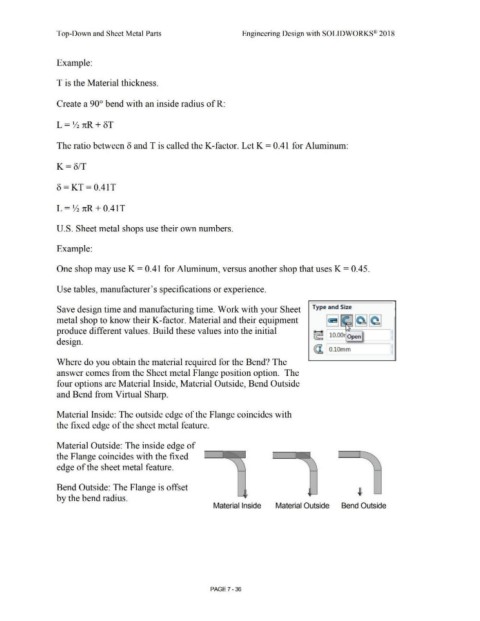
                                                Where do you obtain the material required for the Bend? The


                                                answer comes from the Sheet metal Flange position option.  The


                                                four options are Material Inside, Material Outside, Bend Outside


                                                and Bend from Virtual Sharp.


                                                Material Inside: The outside edge of the Flange coincides with


                                                the fixed edge of the sheet metal feature.


                                                Material Outside: The inside edge of


                                                the Flange coincides with the fixed


                                                edge of the sheet metal feature.


                                                Bend Outside: The Flange is offset


                                                by the bend radius.


                                                                                                                                                                                   Material Inside                                     Material Outside                                       Bend Outside


                                                                                                                                                                                PAGE? - 36

