Page 598 - Subyek Computer Aided Design - [David Planchard] Engineering Design with SOLIDWORKS
P. 598
Top-Down and Sheet Metal Parts                                                                                                                             Engineering Design with SOLIDWORKS® 2018


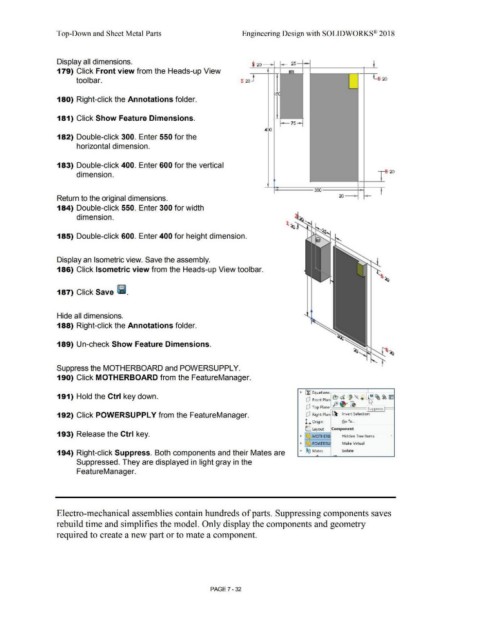
                                                Display all dimensions.
                                                                                                                                                                                                                                  -I
                                                                                                                                                                                                                                                    25 -
                                                                                                                                                                                                                     · 20         - ~  -t                                                                         _J_
                                                179) Click Front view from the Heads-up View                                                                                                                                     I                ...,                                                       -


                                                                                                                                                                                                                                       1l
                                                                tool bar.                                                                                                                                 t  20   -                                                                                                     ~  :  20


                                                                                                                                                                                                                                      I  ~
                                                180) Right-click the Annotations folder.


                                                                                                                                                                                                                                       I
                                                181) Click Show Feature Dimensions.                                                                                                                                                   -~
                                                                                                                                                                                                                                          l-7s-,


                                                                                                                                                                                                                              400


                                                182) Double-click 300. Enter 550 for the


                                                                 horizontal dimension.


                                                183) Double-click 400. Enter 600 for the vertical


                                                                                                                                                                                                                                                                                                                                  ~
                                                                 dimension.                                                                                                                                                                                                                                                       -   20


                                                                                                                                                                                                                                                                                                             -                I
                                                                                                                                                                                                                                                                                                           I
                                                                                                                                                                                                                                 I                                                                         ·~
                                                                                                                                                                                                                                       -                               300                                                    I


                                                Return to the original dimensions.


                                                184) Double-click 550. Enter 300 for width


                                                                 dimension.


                                                185) Double-click 600. Enter 400 for height dimension.


                                                Display an Isometric view. Save the assembly.


                                                186) Click Isometric view from the Heads-up View toolbar.


                                                187) Click Save liii.


                                                Hide all dimensions.


                                                188) Right-click the Annotations folder.


                                                189) Un-check Show Feature Dimensions.


                                                Suppress the MOTHERBOARD and POWERSUPPL Y.


                                                190) Click MOTHERBOARD from the FeatureManager.


                                                191) Hold the Ctrl key down.                                                                                                                                                                               • Efl Equations                                        ~

                                                                                                                                                                                                                                                                (P  Front Plan  e, ~ '  "- ®                          ID ~ ~ Im
                                                                                                                                                                                                                                                                  .                   fe··~

                                                                                                                                                                                                                                                                (P  Top Plane                                     , Suppress

                                                192) Click POWERSUPPL Y from the FeatureManager.                                                                                                                                                                (P  Right Plan  ~ Invert Selection


                                                                                                                                                                                                                                                               L  Origin                      Go To ...


                                                                                                                                                                                                                                                                C Layout             Component
                                                193) Release the Ctrl key.                                                                                                                                                                                 •    ~     MOTHERB                 Hidden Tree Items                        •


                                                                                                                                                                                                                                                           •    ~    POWERSU                  Make Virtual


                                                194) Right-click Suppress. Both components and their Mates are                                                                                                                                             •  ®~ Mates                        lsolate
                                                                                                                                                                                                                                                                         -

                                                                 Suppressed. They are displayed in light gray in the


                                                                 FeatureManager.


                                                Electro-mechanical assemblies contain hundreds of parts. Suppressing components saves


                                                rebuild time and simplifies the model. Only display the components and geometry


                                                required to create a new part or to mate a component.


                                                                                                                                                                                PAGE? - 32
   593   594   595   596   597   598   599   600   601   602   603