


Page 594 - Subyek Computer Aided Design - [David Planchard] Engineering Design with SOLIDWORKS
P. 594
Top-Down and Sheet Metal Parts Engineering Design with SOLIDWORKS® 2018
149) Click OK ~ from the Color PropertyManager. The selected face is ~ ~ ~ -E:r ~ >
displayed in yellow. [,\f'.
~ BOX (Default<Display Stat! "
r • Fe I H;story •
Save the MOTHERBOARD. ia} sensors
• IA) Annotations
150) Click Savelli.
• 00 Equations
Q Front Plane
Q Top Plane
Return to the BOX assembly. Q Right Plane
151) Press Ctrl Tab. Click Yes to rebuild the assembly. L Origin
(:_ Layout
• ~ MOTHERBOARD<2> ->
The MOTHERBOARD contains the new Extruded Boss feature. For • ti] Mates in BOX
now, the MOTHERBOARD is complete. The POWERSUPPLY is the • !})! History
[al Sensors
second key component to be defined In-Context of the BOX assembly. • IA] Annotations
ll] Equations
o-
, 1 / :::c. Materia I < not speci
dJ Front Plane
;Q~ A learning goal of this book is to expose the new user to various dJ Top Plane
tools, techniques and procedures. It may not always use the most direct dJ Right Plane
L Origin
tool or process. • ~ Base Extrude -> -
L Sketch1 ->
......__ ....... ,- v
•
, 1 /
;Q~ Locate External references. Open the BOX assembly before opening individual
components referenced by the assembly when you start a new session of
SOLIDWORKS. The components load and locate their external references to the original
assembly.
POWERSUPPLY-lnsert Component
Create a simplified POWERSUPPL Y part In-Context of the BOX assembly. Utilize the
Layout Sketch in the BOX assembly. Open the POWERSUPPL Y part and insert an
Extruded Boss to represent the connection to a cable.
I Activity: POWERSUPPL Y-lnsert Component
Insert the POWERSUPPL Y component.
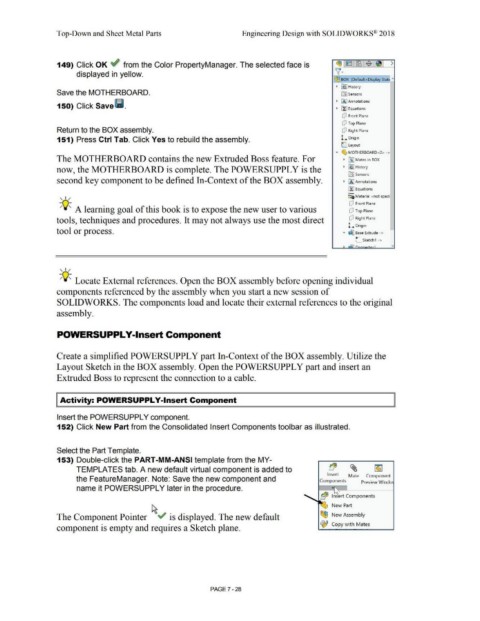
152) Click New Part from the Consolidated Insert Components toolbar as illustrated.
Select the Part Template.
153) Double-click the PART-MM-ANSI template from the MY-
TEMPLATES tab. A new default virtual component is added to b($ ~ ~
Insert Mate Component
the FeatureManager. Note: Save the new component and
Components Preview Windo
name it POWERSUPPL Y later in the procedure. ...
b($ Insert Components
New Part
The Component Pointer ~v" is displayed. The new default ~ New Assembly
t, Copy with Mates
component is empty and requires a Sketch plane.
PAGE?-28

