


Page 590 - Subyek Computer Aided Design - [David Planchard] Engineering Design with SOLIDWORKS
P. 590
Top-Down and Sheet Metal Parts Engineering Design with SOLIDWORKS® 2018
I Activity: MOTHERBOARD-Insert Component
Create the MOTHERBOARD component.
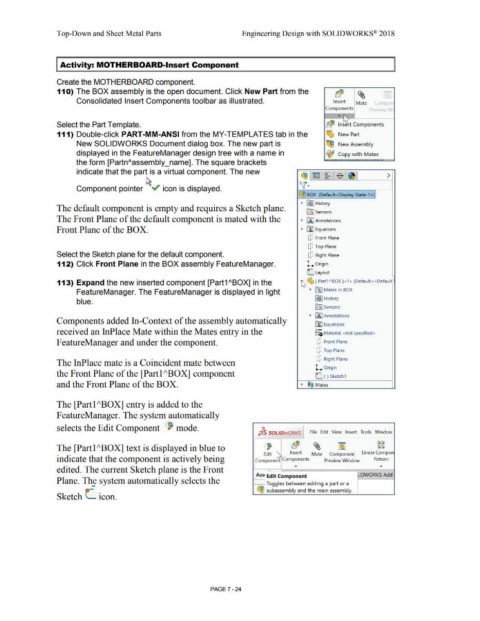
11 O) The BOX assembly is the open document. Click New Part from the Elf$ ~ -
Consolidated Insert Components toolbar as illustrated. Insert Mate (on1pon
~
Components P•eview Wi
.. ~
Select the Part Template. rb($ Insert Components
111) Double-click PART-MM-ANSI from the MY-TEMPLATES tab in the ~ New Part
New SOLIDWORKS Document dialog box. The new part is ~ New Assembly
displayed in the FeatureManager design tree with a name in ~ Copy wit h Mates
the form [PartnAassembly_name]. The square brackets
indicate that the part is a virtual component. The new - ~ [E·I-~ . $ I ~ I >
fl·
Component pointer ~" icon is displayed.
~ BOX (Default<Display State-1 > >I
• &s'J History
The default component is empty and requires a Sketch plane.
lfl] Sensors
The Front Plane of the default component is mated with the • IA] Annotations
Front Plane of the BOX. • [fJ Equations
[P Front Plane
[P Top Plane
Select the Sketch plane for the default component. [P Right Plane
112) Click Front Plane in the BOX assembly FeatureManager. l.. Origin
L Layout
113) Expand the new inserted component [Part1 ABOX] in the hf~ [ Part1ABOX]<1> (Default<<Default 0
FeatureManager. The FeatureManager is displayed in light • 00 Mates in BOX
blue. ~ -I History
ITIJ Sensors
• IA) Annotations
Components added In-Context of the assembly automatically
[fl Equations
received an InPlace Mate within the Mates entry in the o-
~=ii Material <not specified>
FeatureManager and under the component. [P Front Plane
[P Top Plane
[P Right Plane
The InPlace mate is a Coincident mate between
l.. Origin
the Front Plane of the [Partl ;\BOX] component L. (-) Sketch1
and the Front Plane of the BOX. • ®@ Mates
The [Partl ;\BOX] entry is added to the
F eatureManager. The system automatically
selects the Edit Component ~ mode.
J_ls SOLIDWORKS File Edit View Insert Tools Window
The [Partl ;\BOX] text is displayed in blue to ~ 'a($ ~ ~ Cl CJ
CJ[a
Edit 1""'- Insert Mate Component Linear Compon
indicate that the component is actively being Com pone:;. Components Preview Window Pattern
... ...
edited. The current Sketch plane is the Front r r I
Ass/edit C~mpone~t JDWORKS Add-
Plane. The system automatically selects the
- ~
Toggles between editing a part or a
subassembly and the main assembly.
Sketch (_ icon.
PAGE 7 - 24

