Page 587 - Subyek Computer Aided Design - [David Planchard] Engineering Design with SOLIDWORKS
P. 587
Engineering Design with SOLIDWORKS® 2018                                                                                                                                                          Top-Down and Sheet Metal Parts


                                                                        Additional dimensions are required for Equations. Each dimension has a unique variable


                                                                        name. The names are used as Equation variables. The default names are based on the


                                                                        Sketch, Feature or Part. Feature names do not have to be changed. Rename variables for


                                                                        clarity when creating numerous Equations.


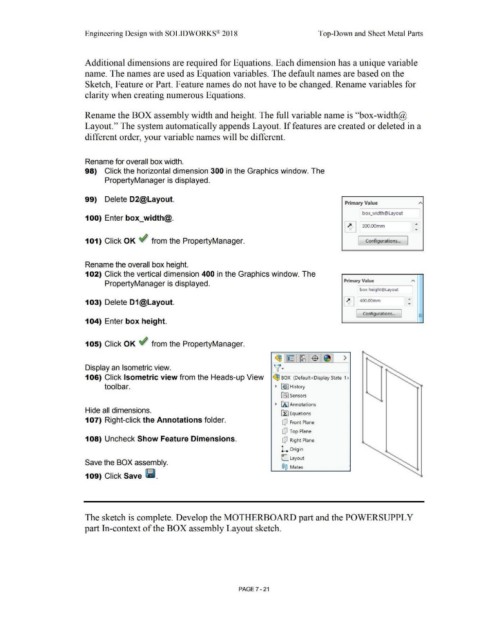
                                                                        Rename the BOX assembly width and height. The full variable name is ''box-width@


                                                                        Layout.'' The system automatically appends Layout. If features are created or deleted in a


                                                                        different order, your variable names will be different.


                                                                        Rename for overall box width.


                                                                        98)  Click the horizontal dimension 300 in the Graphics window. The


                                                                                        PropertyManager is displayed.


                                                                        99)  Delete D2@Layout.
                                                                                                                                                                                                                                                                                                 Primary Value


                                                                                                                                                                                                                                                                                                               box_width@Layout
                                                                        100) Enter box_width@.


                                                                                                                                                                                                                                                                                                ~ 300.00mm                                                 ,..


                                                                        101) Click OK ~ from the PropertyManager.                                                                                                                                                                                           [  Configurations...                     ]


                                                                        Rename the overall box height.


                                                                        102) Click the vertical dimension 400 in the Graphics window. The


                                                                                                                                                                                                                                                                                                Primary Value
                                                                                        PropertyManager is displayed.


                                                                                                                                                                                                                                                                                                             box height@Layout


                                                                        103) Delete D1@Layout.                                                                                                                                                                                                  ~ 400.00mm


                                                                                                                                                                                                                                                                                                                                                              -
                                                                                                                                                                                                                                                                                                                Configurations...              J              -
                                                                                                                                                                                                                                                                                                                                                              -
                                                                        104) Enter box height.


                                                                        105) Click OK ~ from the PropertyManager.


                                                                                                                                                                                                                                      ~1~ 1~1$ 1~1 >

                                                                                                                                                                                                                                     v·
                                                                        Display an Isometric view.


                                                                        106) Click Isometric view from the Heads-up View                                                                                                             ~ BOX  (Default <Display State-1 >


                                                                                        tool bar.                                                                                                                                     •  ~I History


                                                                                                                                                                                                                                           ~       Sensors


                                                                                                                                                                                                                                      • IA I Annotations
                                                                        Hide all dimensions.
                                                                                                                                                                                                                                           Efl Equations

                                                                        107) Right-click the Annotations folder.                                                                                                                             dJ  Front Plane


                                                                                                                                                                                                                                             dJ  Top Plane

                                                                        108) Uncheck Show Feature Dimensions.                                                                                                                                dJ  Right Plane


                                                                                                                                                                                                                                           l. Origin


                                                                                                                                                                                                                                            C      Layout
                                                                        Save the BOX assembly.
                                                                                                                                                                                                                                            ®@  Mates

                                                                        109) Click Save Iii.


                                                                        The sketch is complete. Develop the MOTHERBOARD part and the POWERSUPPL Y


                                                                       part In-context of the BOX assembly Layout sketch.


                                                                                                                                                                                                        PAGE? - 21
   582   583   584   585   586   587   588   589   590   591   592