Page 586 - Subyek Computer Aided Design - [David Planchard] Engineering Design with SOLIDWORKS
P. 586
Top-Down and Sheet Metal Parts                                                                                                                             Engineering Design with SOLIDWORKS® 2018


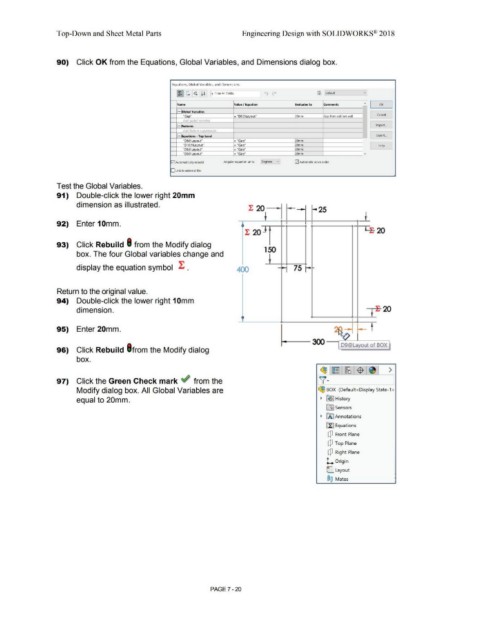
                                                90)  Click OK from the Equations, Global Variables, and Dimensions dialog box.


                                                                                                                                                Equations, Global Variables, and Dimensions


                                                                                                                                                    ~C:[&J[ii]                  l'i' Filter All Fields                   ]   ti)  ("                                      ~     Default                         vj


                                                                                                                                                    •
                                                                                                                                                     Name                                           Value I  Equation                                  Evaluates to            Comments                          "    I      OK         I

                                                                                                                                                     - lGlobal Variables

                                                                                                                                                          "Gao'"                                    = "D9@Lavout"                                      20mm                    Gao from cabinet wall           I           Cancel
                                                                                                                                                         Add alobol variable

                                                                                                                                                     - [Fe•tures                                                                                                              I                                            Import ...
                                                                                                                                                         Add feature sunnression

                                                                                                                                                    r=JEqu•tions - Top Level                                                                                                                                               Export ..
                                                                                                                                                                                                                                                                                                               '
                                                                                                                                                          "DB~out"                                  = "Gap ..                                          20mm
                                                                                                                                                          "DlO~       out"                          = "Gait                                            20mm                                                                  Help
                                                                                                                                                          "DS@J:il)IOUt"                            = "Gag·                                            20mm
                                                                                                                                                          "D6@~out"                                 = ::_Gag"                                          20mm                                                      v
                                                                                                                                                                                 -                                                             -
                                                                                                                                                                                                                                        v
                                                                                                                                               G2I Automatically rebuild                   Angular equation units:         Degrees                     G2I Automatic solve order


                                                                                                                                               O Link to external file:


                                                Test the Global Variables.


                                                91)  Double-click the lower right 20mm


                                                                 dimension as illustrated.
                                                                                                                                                                                                                l: 20                                                -25


                                                                                                                                                                                                                              ~'                                                                                 ~'

                                                92)  Enter 1 Omm.                                                                                                                                           I                                   I               I  I

                                                                                                                                                                                                                                                                                                                 Lt  2
                                                                                                                                                                                                             l: 20 ~ I  I                                                                                                      0


                                                93)  Click Rebuild I from the Modify dialog

                                                                                                                                                                                                                             150
                                                                 box. The four Global variables change and


                                                                                                                                                                                                                                 I
                                                                 display the equation symbol  l: .                                                                                                    400                                      I      75 r-           -
                                                                                                                                                                                                                                                •


                                                Return to the original value.


                                                94)  Double-click the lower right 1 Omm


                                                                                                                                                                                                                                                                                                                          ~
                                                                 dimension.                                                                                                                                                                                                                                               -     20

                                                                                                                                                                                                                                                                                                                        I
                                                                                                                                                                                                          t


                                                95)  Enter 20mm.                                                                                                                                                                                                                                                      ii


                                                96)  Click Rebuild l from the Modify dialog


                                                                 box.


                                                                                                                                                                                                                                                                            (§31~ :~1$ 1~1 >


                                                97)  Click the Green Check mark ~ from the                                                                                                                                                                                 )!.


                                                                 Modify dialog box. All Global Variables are                                                                                                                                                              ~ BOX  (Default<Display State-1.>


                                                                 equal to 20mm.                                                                                                                                                                                             ~  ~ I History


                                                                                                                                                                                                                                                                                 [TI) Sensors


                                                                                                                                                                                                                                                                            ~  00 Annotations


                                                                                                                                                                                                                                                                                 E.fl Equations


                                                                                                                                                                                                                                                                                  [P  Front Plane


                                                                                                                                                                                                                                                                                  [P  Top Plane


                                                                                                                                                                                                                                                                                  [P  Right  Plane


                                                                                                                                                                                                                                                                                 l. Origin


                                                                                                                                                                                                                                                                                 C Layout


                                                                                                                                                                                                                                                                                  ®@  Mates


                                                                                                                                                                                PAGE?-20
   581   582   583   584   585   586   587   588   589   590   591