Page 589 - Subyek Computer Aided Design - [David Planchard] Engineering Design with SOLIDWORKS
P. 589
Engineering Design with SOLIDWORKS® 2018                                                                                                                                                          Top-Down and Sheet Metal Parts


                                                                        CircuitW orks utilizes industry-


                                                                        standard ID F files or PADS files,


                                                                        and produces the 3D


                                                                        SOLIDWORKS assembly of the


                                                                        MOTHERBOARD. IDF and


                                                                        PADS are common file formats


                                                                       utilized in the PCB industry.


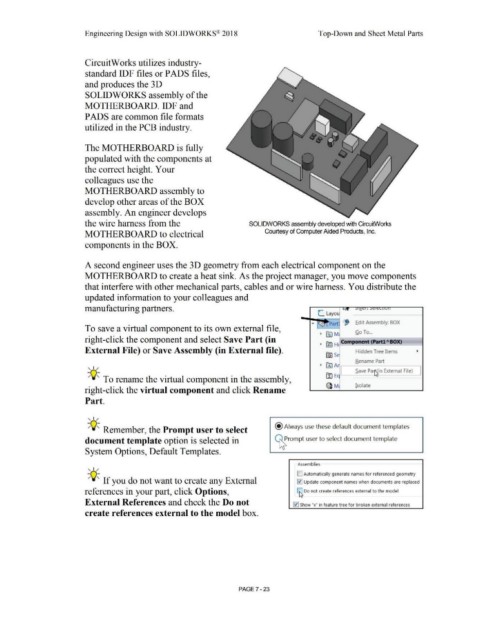
                                                                        The MOTHERBOARD is fully


                                                                       populated with the components at


                                                                        the correct height. Your


                                                                        colleagues use the


                                                                        MOTHERBOARD assembly to


                                                                        develop other areas of the BOX


                                                                        assembly. An engineer develops


                                                                        the wire harness from the                                                                                                                SOLIDWORKS assembly developed with CircuitWorks


                                                                        MOTHERBOARD to electrical                                                                                                                             Courtesy of Computer Aided Products, Inc.


                                                                        components in the BOX.


                                                                        A second engineer uses the 30 geometry from each electrical component on the


                                                                        MOTHERBOARD to create a heat sink. As the project manager, you move components


                                                                        that interfere with other mechanical parts, cables and or wire harness. You distribute the


                                                                       updated information to your colleagues and


                                                                       manufacturing partners.

                                                                                                                                                                                                                                                                          L  Layou


                                                                                                                                                                                                                                                                                                f
                                                                                                                                                                                                                                                                                    Pa                   .Edit Assembly: BOX
                                                                        To save a virtual component to its own external file,

                                                                                                                                                                                                                                                                            •  ~        M                 Go To ...
                                                                                                                                                                                                                                                                                            ---------
                                                                        right-click the component and select Save Part (in                                                                                                                                                  •  ~ Hi Com  nent (PartlABOX)


                                                                        External File) or Save Assembly (in External file).                                                                                                                                                                               Hidden Tree Items
                                                                                                                                                                                                                                                                                 fiil s


                                                                                                                                                                                                                                                                                                         Rename Part
                                                                                                                                                                                                                                                                            •  IA) A  ~-------~
                                                                          , 1/                                                                                                                                                                                                                           .$ave Pantlin External File)

                                                                                                                                                                                                                                                                                 (!) E       I                          ~
                                                                          -;Q~ To rename the virtual component in the assembly,

                                                                                                                                                                                                                                                                                 Q M                     Isolate
                                                                        right-click the virtual component and click Rename


                                                                        Part.


                                                                          , 1 /


                                                                          -;Q~ Remember, the Prompt user to select                                                                                                                    @Always use these default document templates


                                                                        document template option is selected in                                                                                                                               Prompt user to select document template


                                                                        System Options, Default Templates.


                                                                                                                                                                                                                                                         Assemblies

                                                                          , 1 /
                                                                                                                                                                                                                                                        [] Automatically generate names for referenced geometry

                                                                          -;Q~ If you do not want to create any External                                                                                                                                !v'! Update component names when documents are replaced


                                                                        references in your part, click Options,                                                                                                                                         [t1, Do not create references external to the model


                                                                        External References and check the Do not                                                                                                                                     I v1 I Show "x" in feature tree for broken external references


                                                                        create references external to the model box.


                                                                                                                                                                                                        PAGE? - 23
   584   585   586   587   588   589   590   591   592   593   594