Page 592 - Subyek Computer Aided Design - [David Planchard] Engineering Design with SOLIDWORKS
P. 592
Top-Down and Sheet Metal Parts                                                                                                                             Engineering Design with SOLIDWORKS® 2018


                                                Return to the BOX assembly.


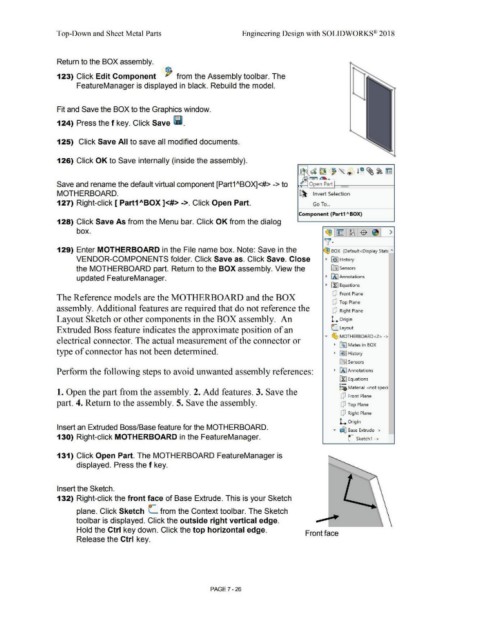
                                                123) Click Edit Component  ~ from the Assembly toolbar. The


                                                                 FeatureManager is displayed in black. Rebuild the model.


                                                Fit and Save the BOX to the Graphics window.


                                                124) Press the f key. Click Save lii.


                                                125)  Click Save All to save all modified documents.


                                                126) Click OK to Save internally (inside the assembly).


                                                                                                                                                                                                                                                            ~
                                                                                                                                                                                                                                                           I       d~                                      l ~ ~~ irn
                                                                                                                                                                                                                                                           I"  '                     ~     "' ®
                                                                                                                                                                                                                                                              -   ~
                                                                                                                                                                                                                                                              -
                                                Save and rename the default virtual component [Part1 "BOX]<#> -> to                                                                                                                                        ~       Open Part


                                                MOTHERBOARD.                                                                                                                                                                                               ~
                                                                                                                                                                                                                                                                      Invert Selection


                                                127) Right-click [ Part1 ABOX ]<#> ->.  Click Open Part.                                                                                                                                                              Go To  ...


                                                                                                                                                                                                                                                          Component (Part1 "'BOX)


                                                128) Click Save As from the Menu bar. Click OK from the dialog


                                                                 box.                                                                                                                                                                                                           (93 ~~ $~  >


                                                                                                                                                                                                                                                                                )[·


                                                129) Enter MOTHERBOARD in the File name box. Note: Save in the                                                                                                                                                                 (93 BOX  (Default<Display State  "'


                                                                VENDOR-COMPONENTS folder. Click Save as. Click Save. Close                                                                                                                                                      •  [€} J History


                                                                the MOTHERBOARD part.  Return to the BOX assembly. View the                                                                                                                                                          lflJ Sensors


                                                                 updated FeatureManager.                                                                                                                                                                                        • fA"l Annotations


                                                                                                                                                                                                                                                                                •  ll:] Equations


                                                                                                                                                                                                                                                                                      dJ  Front Plane
                                                The Reference models are the MOTHERBOARD and the BOX


                                                                                                                                                                                                                                                                                      dJ  Top Plane
                                                assembly. Additional features are required that do not reference the                                                                                                                                                                  dJ  Right Plane


                                                Layout Sketch or other components in the BOX assembly.  An                                                                                                                                                                           l. Origin


                                                Extruded Boss feature indicates the approximate position of an                                                                                                                                                                       L  Layout


                                                                                                                                                                                                                                                                                "'  ~ MOTHERBOARD <2>  - >
                                                electrical connector. The actual measurement of the connector or

                                                                                                                                                                                                                                                                                       •  ~ Mates in BOX
                                                type of connector has not been determined.                                                                                                                                                                                             • IJ9 I History


                                                                                                                                                                                                                                                                                            ~      Sensors


                                                Perform the following steps to avoid unwanted assembly references:                                                                                                                                                                      •  [A] Annotations


                                                                                                                                                                                                                                                                                            ~ Equations
                                                                                                                                                                                                                                                                                            o-
                                                                                                                                                                                                                                                                                            ::o Material <not speci
                                                1. Open the part from the assembly. 2. Add features. 3. Save the


                                                                                                                                                                                                                                                                                             dJ  Front Plane
                                                part. 4. Return to the assembly. 5. Save the assembly.                                                                                                                                                                                       dJ  Top Plane


                                                                                                                                                                                                                                                                                             dJ  Right Plane


                                                                                                                                                                                                                                                                                            l. Origin
                                                Insert an Extruded Boss/Base feature for the MOTHERBOARD.
                                                                                                                                                                                                                                                                                                   .-
                                                                                                                                                                                                                                                                                       ....  ~ Base Extrude - >                      -

                                                130) Right-click MOTHERBOARD in the FeatureManager.                                                                                                                                                                                                L      Sketch1  ->


                                                131) Click Open Part. The MOTHERBOARD FeatureManager is


                                                                 displayed. Press the f key.


                                                Insert the Sketch.


                                                132) Right-click the front face of Base Extrude. This is your Sketch


                                                                                                                             o-

                                                                 plane. Click Sketch  L  from the Context toolbar. The Sketch


                                                                toolbar is displayed. Click the outside right vertical edge.


                                                                 Hold the Ctrl key down. Click the top horizontal edge.
                                                                                                                                                                                                                                                                Front face


                                                                 Release the Ctrl key.


                                                                                                                                                                                PAGE? - 26
   587   588   589   590   591   592   593   594   595   596   597