Page 591 - Subyek Computer Aided Design - [David Planchard] Engineering Design with SOLIDWORKS
P. 591
Engineering Design with SOLIDWORKS® 2018                                                                                                                                                          Top-Down and Sheet Metal Parts


                                                                                                                                                                 - -               -


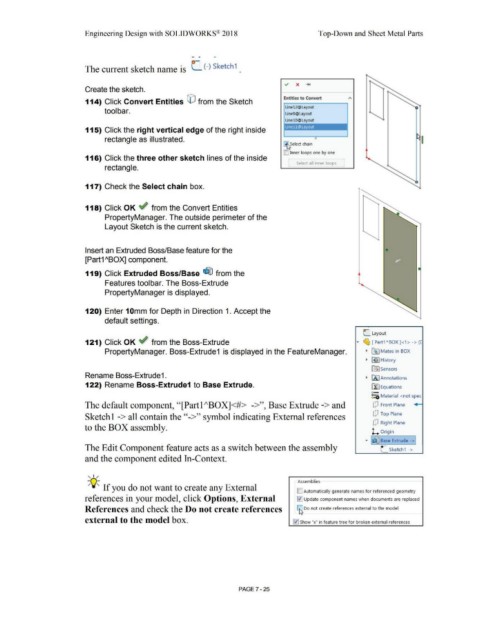
                                                                        The current sketch name is  (_ (-) Sketch 1 .


                                                                        Create the sketch.


                                                                                                                                                                                                                                              Entities to Convert
                                                                        114) Click Convert Entities © from the Sketch


                                                                                                                                                                                                                                               Line12@Layout
                                                                                        tool bar.                                                                                                                                              Line9@Layout


                                                                                                                                                                                                                                               LinelO@Layout

                                                                                                                                                                                                                                              i Linell@Layout                                     I
                                                                        115) Click the right vertical edge of the right inside


                                                                                        rectangle as illustrated.                                                                                                                                                      0

                                                                                                                                                                                                                                             ~       elect chain


                                                                                                                                                                                                                                             D inner loops one by one
                                                                        116) Click the three other sketch lines of the inside

                                                                                                                                                                                                                                                 [      Select all inner loops  ]
                                                                                        rectangle.


                                                                        117) Check the Select chain box.


                                                                        118) Click OK ~ from the Convert Entities


                                                                                        PropertyManager. The outside perimeter of the


                                                                                        Layout Sketch is the current sketch.


                                                                        Insert an Extruded Boss/Base feature for the                                                                                                                                                                                                              •


                                                                        [Part1 ABQX] component.


                                                                        119) Click Extruded Boss/Base ~ from the


                                                                                        Features toolbar. The Boss-Extrude


                                                                                        PropertyManager is displayed.


                                                                        120) Enter 10mm for Depth in Direction 1. Accept the


                                                                                        default settings.


                                                                                                                                                                                                                                                                                                                C Layout


                                                                        121) Click OK ~  from the Boss-Extrude                                                                                                                                                                                            ....  ~      [Part1"BOX]<1> -> ([


                                                                                        PropertyManager. Boss-Extrude1  is displayed in the FeatureManager.                                                                                                                                                       • F~1 Mates in BOX


                                                                                                                                                                                                                                                                                                                  •  H!) I History


                                                                                                                                                                                                                                                                                                                       ~Sensors

                                                                        Rename Boss-Extrude1 .                                                                                                                                                                                                                    •  [A I Annotations


                                                                        122) Rename Boss-Extrude1 to Base Extrude.                                                                                                                                                                                                     [fJ Equations


                                                                                                                                                                                                                                                                                                                       o-
                                                                                                                                                                                                                                                                                                                       ~=ii, Material  <not spec


                                                                        The default component, ''[Partl "BOX]<#>  ->'', Base Extrude -> and                                                                                                                                                                             [P  Front  Plane


                                                                        Sketchl -> all contain the ''->'' symbol indicating External references                                                                                                                                                                         [P  Top Plane


                                                                                                                                                                                                                                                                                                                        [P  Right Plane
                                                                        to the BOX assembly.

                                                                                                                                                                                                                                                                                                                       1... Origin


                                                                                                                                                                                                                                                                                                                              .-
                                                                                                                                                                                                                                                                                                                 ....  I~ Base Extrude - >]

                                                                        The Edit Component feature acts as a switch between the assembly                                                                                                                                                                                      L  Sketch1  - >


                                                                       and the component edited In-Context.


                                                                          '  I  /
                                                                                                                                                                                                                                                         Assemblies
                                                                          -;Q~ If you do not want to create any External

                                                                                                                                                                                                                                                        [] Automatically generate names for referenced geometry

                                                                       references in your model, click Options, External                                                                                                                                !v'! Update component names when documents are replaced


                                                                        References and check the Do not create references                                                                                                                                ca Do not create references external to the model


                                                                        external to the model box.                                                                                                                                                   I :JI Show "x" in feature tree for broken external references


                                                                                                                                                                                                        PAGE? -25
   586   587   588   589   590   591   592   593   594   595   596