Page 597 - Subyek Computer Aided Design - [David Planchard] Engineering Design with SOLIDWORKS
P. 597
Engineering Design with SOLIDWORKS® 2018                                                                                                                                                          Top-Down and Sheet Metal Parts


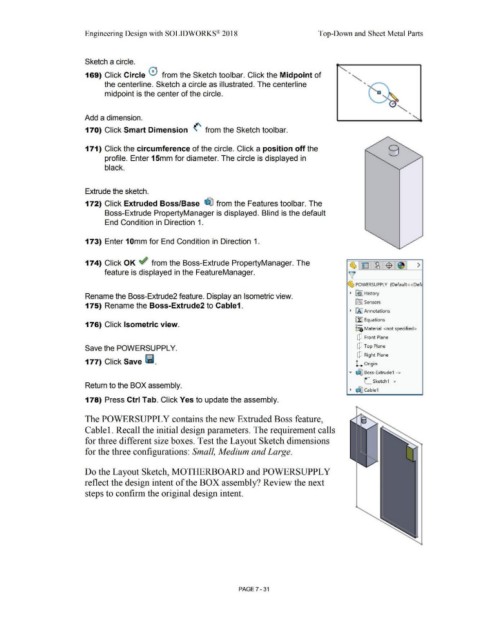
                                                                        Sketch a circle.


                                                                                                                                                                                                                                                                                                    ..


                                                                        169) Click Circle 0  from the Sketch toolbar. Click the Midpoint of
                                                                                                                                                                                                                                                                                                                ..
                                                                                        the centerline. Sketch a circle as illustrated. The centerline


                                                                                        midpoint is the center of the circle.                                                                                                                                                                                               a


                                                                                                                                                                                                                                                                                                                                                      ..


                                                                       Add a dimension.


                                                                        170) Click Smart Dimension  (' from the Sketch toolbar.


                                                                        171) Click the circumference of the circle. Click a position off the


                                                                                        profile. Enter 15mm for diameter. The circle is displayed in


                                                                                        black.


                                                                        Extrude the sketch.


                                                                        172) Click Extruded Boss/Base  ~ from the Features toolbar. The


                                                                                        Boss-Extrude PropertyManager is displayed. Blind is the default


                                                                                        End Condition in Direction 1.


                                                                        173) Enter 1 Omm for End Condition in Direction 1.


                                                                        174) Click OK ~ from the Boss-Extrude PropertyManager. The                                                                                                                                                                   ~ E  ~ -$  ~  >


                                                                                        feature is displayed in the FeatureManager.                                                                                                                                                                 )[


                                                                                                                                                                                                                                                                                                   ~ POWERSUPPLY  (Default <<Defc


                                                                                                                                                                                                                                                                                                     ~  ~ I History
                                                                        Rename the Boss-Extrude2 feature. Display an Isometric view.


                                                                                                                                                                                                                                                                                                          iftJ Sensors
                                                                        175) Rename the Boss-Extrude2 to Cable1.

                                                                                                                                                                                                                                                                                                     ~  liAJ Annotations


                                                                                                                                                                                                                                                                                                         [fJ Equations
                                                                        176) Click Isometric view.                                                                                                                                                                                                       o-
                                                                                                                                                                                                                                                                                                         ::e Material  <not specified>


                                                                                                                                                                                                                                                                                                           dJ  Front Plane


                                                                        Save the POWERSUPPL Y.                                                                                                                                                                                                             dJ  Top Plane


                                                                                                                                                                                                                                                                                                           dJ  Right Plane
                                                                        177) Click Save l11.                                                                                                                                                                                                              L  Origin


                                                                                                                                                                                                                                                                                                    • dJ:I Boss-Extrude1  ->


                                                                                                                                                                                                                                                                                                                 L_ Sketch1  ->
                                                                        Return to the BOX assembly.

                                                                                                                                                                                                                                                                                                     ~  dIJ Cable1


                                                                        178) Press Ctrl Tab. Click Yes to update the assembly.


                                                                        The POWERSUPPL Y contains the new Extruded Boss feature,


                                                                        Cable 1. Recall the initial design parameters. The requirement calls


                                                                        for three different size boxes. Test the Layout Sketch dimensions


                                                                        for the three configurations: Small, Medium and Large.


                                                                        Do the Layout Sketch, MOTHERBOARD and POWERSUPPL Y


                                                                        reflect the design intent of the BOX assembly? Review the next


                                                                        steps to confirm the original design intent.


                                                                                                                                                                                                        PAGE 7 -31
   592   593   594   595   596   597   598   599   600   601   602