


Page 584 - Subyek Computer Aided Design - [David Planchard] Engineering Design with SOLIDWORKS
P. 584
Top-Down and Sheet Metal Parts Engineering Design with SOLIDWORKS® 2018
Activity: Create Global Variables and Equations
Display the Equations folder in the FeatureManager and display the dimensions in the Graphics
window.
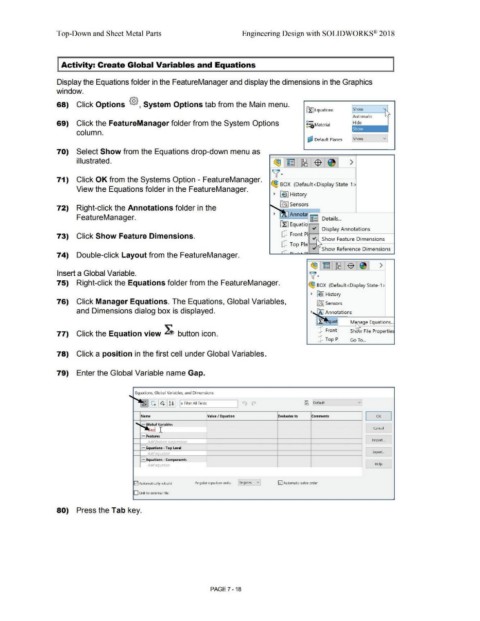
68) Click Options {§}, System Options tab from the Main menu.
~ Equations Show v
Automatic
69) Click the FeatureManager folder from the System Options o- Hide
: :aMaterial
column.
~ Default Planes ..... sh_ow ___ v_
70) Select Show from the Equations drop-down menu as
illustrated. ~ ~ ~ -$ >
v·
71) Click OK from the Systems Option - FeatureManager.
~ BOX (Default<Display State-1 >
View the Equations folder in the FeatureManager.
~ ~I History
[fr! Sensors
72) Right-click the Annotations folder in the
FeatureManager. Detai Is ...
Display Annotations
dJ Front p1,1---+----------1
73) Click Show Feature Dimensions. v Show Feature Dimensions
dJ Top Pla"--..i
v Show Reference Dimensions
74) Double-click Layout from the FeatureManager.
~ ~ [Rs 1$ ~ >
Insert a Global Variable. \(·
75) Right-click the Equations folder from the FeatureManager. ~ BOX (Default< Display State-1 >
~ B9 I History
76) Click Manager Equations. The Equations, Global Variables, [al Sensors
and Dimensions dialog box is displayed. ~~ notations
:r ua· M ,rage Equations ...
77) Click the Equation view ~ button icon. [!] Front Shd ~ File Propertiei
dJ Top 9 Go To ...
78) Click a position in the first cell under Global Variables.
79) Enter the Global Variable name Gap.
.... Equations, Global Variables, and Dimensions
~ ~~~ I ~ (M ~ Default v
IT Filter All Fields
Name Value/ Equation Evaluates to Comments OK
I I
...... 1-tobal Variables
anl I Cancel
FlFeatures
Add feature suopression Import ...
Fleq uations • Top Level
Add equation Export ...
Flequat.ions • Components
Add equation Help
-
!;21 Automatically rebuild Angular equation units: !Degrees vl !;21Automatic solve order
D Link to external file:
80) Press the Tab key.
PAGE 7-18

