Page 617 - Subyek Computer Aided Design - [David Planchard] Engineering Design with SOLIDWORKS
P. 617
Engineering Design with SOLIDWORKS® 2018                                                                                                                                                          Top-Down and Sheet Metal Parts


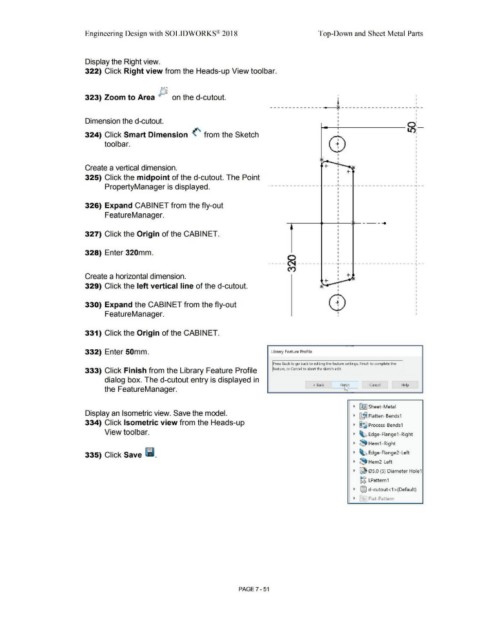
                                                                        Display the Right view.


                                                                        322) Click Right view from the Heads-up View toolbar.


                                                                        323) Zoom to Area P,                                                     on the d-cutout.                                                                                                                          •                                                                I  I

                                                                                                                                                                                                                                                                                           I
                                                                                                                                                                                                                                  ---------------4 -------------------_ :_ -


                                                                                                                                                                                                                                                                                                                                                            I
                                                                                                                                                                                                                                                                                           I

                                                                                                                                                                                                                                                                            i------,,--------0:-
                                                                        Dimension the d-cutout.                                                                                                                                                                                            I


                                                                        324) Click Smart Dimension  (' from the Sketch                                                                                                                                                                     I                                                         l/),


                                                                                        tool bar.


                                                                                                                                                                                                                                                                                           I
                                                                                                                                                                                                                                                                                           I
                                                                                                                                                                                                                                                                                           I
                                                                        Create a vertical dimension.                                                                                                                                                                                       I            '
                                                                                                                                                                                                                                                                                           I      +-
                                                                                                                                                                                                                                                                                           I
                                                                        325) Click the midpoint of the d-cutout. The Point

                                                                                                                                                                                                                                                                                                                                                            I
                                                                                        PropertyManager is displayed.                                                                                                            .  -  -  - -   -  - -   -  -  - -    -  - .  -   - -   _ ,_  -   -  -  - -   -   - -   -  -  - -   -   - -   -  - -   -  -i -   -
                                                                                                                                                                                                                                                                                                                                                            I


                                                                        326) Expand CABINET from the fly-out


                                                                                        FeatureManager.                                                                                                                                                                                    I

                                                                                                                                                                                                                                                                                           I                       __ ...
                                                                                                                                                                                                                                                                                           •


                                                                        327) Click the Origin of the CABINET.


                                                                        328) Enter 320mm.

                                                                                                                                                                                                                                                 0
                                                                                                                                                                                                                                 ----- ~ ------                                ----,--------------------,--
                                                                                                                                                                                                                                                                                                                                                            I
                                                                                                                                                                                                                                                 cry                                       I                                                                I

                                                                                                                                                                                                                                                                                           I                                                                I
                                                                        Create a horizontal dimension.                                                                                                                                                                                     I      +-  Jv
                                                                                                                                                                                                                                                                                           I
                                                                                                                                                                                                                                                                                +-
                                                                        329) Click the left vertical line of the d-cutout.                                                                                                                                                  ~--            I


                                                                                                                                                                                                                                                                                           I
                                                                                                                                                                                                                                                                                           '


                                                                        330) Expand the CABINET from the fly-out


                                                                                        FeatureManager.


                                                                        331) Click the Origin of the CABINET.


                                                                        332) Enter 50mm.                                                                                                                                           Library Feature Profile


                                                                                                                                                                                                                                     Press Back to go back to editing the feature settings, Finish to complete the


                                                                        333) Click Finish from the Library Feature Profile                                                                                                            eature, or Cancel to abort the sketch edit.


                                                                                        dialog box. The d-cutout entry is displayed in


                                                                                                                                                                                                                                                                      < Back                 Fiq'.$,,____,           Cancel                     Help
                                                                                        the FeatureManager.                                                                                                                                                                          -


                                                                                                                                                                                                                                                                                                        •  ~ Sheet-Metal

                                                                        Display an Isometric view. Save the model.
                                                                                                                                                                                                                                                                                                        •  ~~ Flatten-Bends1

                                                                        334) Click Isometric view from the Heads-up                                                                                                                                                                                     •  ~~ Process-Bends1


                                                                                        View toolbar.                                                                                                                                                                                                   •  ~ Edge-Flange1-Right


                                                                                                                                                                                                                                                                                                        ~  ~ Hem1 -Right


                                                                        335) Click Save lil.                                                                                                                                                                                                            •  ~ Edge-Flange2-Left


                                                                                                                                                                                                                                                                                                        •  ~ Hem2-Left


                                                                                                                                                                                                                                                                                                        •  ~ 05.0 (5) Diameter Hole1


                                                                                                                                                                                                                                                                                                             ~~ LPattern1


                                                                                                                                                                                                                                                                                                        ~  @l  d-cutout< 1 >(Default)


                                                                                                                                                                                                                                                                                                        •  ~' Flat-Pattern


                                                                                                                                                                                                        PAGE 7 - 51
   612   613   614   615   616   617   618   619   620   621   622