Page 618 - Subyek Computer Aided Design - [David Planchard] Engineering Design with SOLIDWORKS
P. 618
Top-Down and Sheet Metal Parts                                                                                                                             Engineering Design with SOLIDWORKS® 2018


                                                   , 1 /


                                                  ;Q~ With thin sheet metal parts, select the dimension references with care. Use the Zoom


                                                and Rotate commands to view the correct edge. Use reference planes or the Origin to


                                                create dimensions. The Origin and planes do not change during the flat and formed states.


                                                   , 1 /


                                                  ;Q~ Save time with the Modify Sketch tool. Utilize the left


                                                and right mouse point positioned on the large black dots.                                                                                                                                                  0


                                                The left button Pans and the right button Rotates. The


                                                center dot reorients the Origin of the sketch and Mirrors the


                                                                                                                                                              '         r          I'-   ~    1L
                                                                                                                                                                        L
                                                                                                                                                                                         •
                                                                                                                                                              "'~
                                                                                                                                                                                   ~
                                                                                                                                                                ~
                                                                                                                                                                                    'I:
                                                sketch about y, x or both.


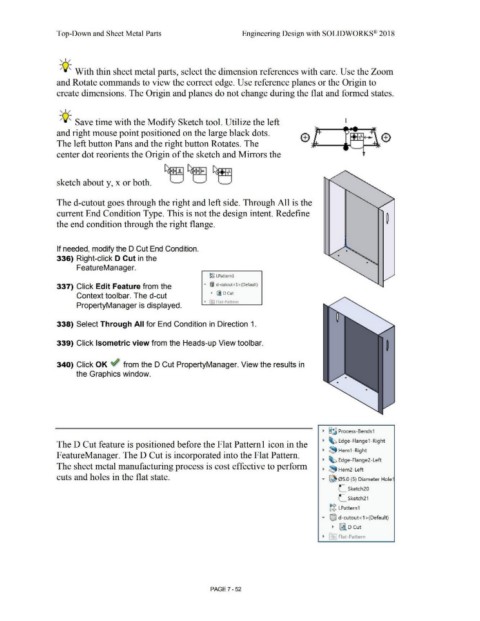
                                                The d-cutout goes through the right and left side. Through All is the


                                                current End Condition Type. This is not the design intent. Redefine


                                                the end condition through the right flange.


                                                If needed, modify the D Cut End Condition.


                                                336) Right-click D Cut in the


                                                                 FeatureManager.


                                                                                                                                                                                ~g LPatternl


                                                337) Click Edit Feature from the                                                                                           "'  ®I  d-cutout<l >(Default)


                                                                 Context toolbar. The d-cut                                                                                      • ii D Cut

                                                                                                                                                                           • F-1 Flat-Pattern
                                                                 PropertyManager is displayed.


                                                338) Select Through All for End Condition in Direction 1.


                                                339) Click Isometric view from the Heads-up View toolbar.


                                                340) Click OK ~ from the D Cut PropertyManager. View the results in


                                                                the Graphics window.


                                                                                                                                                                                                                                                                              •  §~ Process- Bends1


                                                                                                                                                                                                                                                                              •  ~ Edge-Flange1 -Right
                                                The D Cut feature is positioned before the Flat Patteml icon in the


                                                                                                                                                                                                                                                                              •  ~ Hem1 -Right
                                                F eatureManager. The D Cut is incorporated into the Flat Pattern.

                                                                                                                                                                                                                                                                              •  ~ Edge-Flange2- Left
                                                The sheet metal manufacturing process is cost effective to perform

                                                                                                                                                                                                                                                                              •  ~ Hem2- Left

                                                cuts and holes in the flat state.                                                                                                                                                                                            .,...  ~ 05.0 (5) Diameter Hole1
                                                                                                                                                                                                                                                                                           .-


                                                                                                                                                                                                                                                                                           .-      Sketch20
                                                                                                                                                                                                                                                                                           L


                                                                                                                                                                                                                                                                                           L       Sketch21


                                                                                                                                                                                                                                                                                    ~g  LPattern1


                                                                                                                                                                                                                                                                             .....  ®J  d-cutout<1 >(Default)


                                                                                                                                                                                                                                                                                      •  ~ D Cut


                                                                                                                                                                                                                                                                              • f~I Flat-Pattern


                                                                                                                                                                                PAGE?-52
   613   614   615   616   617   618   619   620   621   622   623