


Page 120 - Make Your Own PCBs with EAGLE from Schematic Designs to Finished Boards
P. 120
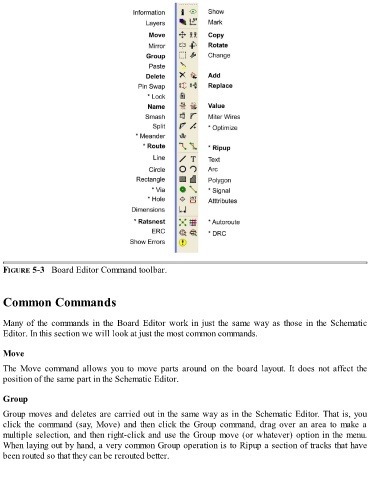
FIGURE 5-3   Board Editor Command toolbar.


  Common Commands


  Many of the commands in the Board Editor work in just the same way as those in the Schematic
  Editor. In this section we will look at just the most common commands.


  Move

  The  Move  command  allows  you  to  move  parts  around  on  the  board  layout.  It  does  not  affect  the

  position of the same part in the Schematic Editor.


  Group

  Group moves and deletes are carried out in the same way as in the Schematic Editor. That is, you
  click the command (say, Move) and then click the Group command, drag over an area to make a
  multiple selection, and then right-click and use the Group move (or whatever) option in the menu.
  When laying out by hand, a very common Group operation is to Ripup a section of tracks that have
  been routed so that they can be rerouted better.

