


Page 119 - Make Your Own PCBs with EAGLE from Schematic Designs to Finished Boards
P. 119
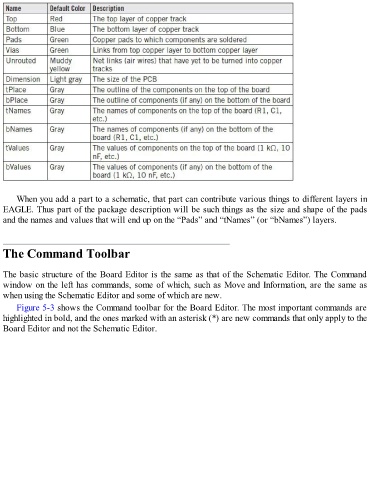
When you add a part to a schematic, that part can contribute various things to different layers in
  EAGLE. Thus part of the package description will be such things as the size and shape of the pads

  and the names and values that will end up on the “Pads” and “tNames” (or “bNames”) layers.


  The Command Toolbar


  The basic structure of the Board Editor is the same as that of the Schematic Editor. The Command
  window on the left has commands, some of which, such as Move and Information, are the same as
  when using the Schematic Editor and some of which are new.

      Figure 5-3 shows the Command toolbar for the Board Editor. The most important commands are
  highlighted in bold, and the ones marked with an asterisk (*) are new commands that only apply to the
  Board Editor and not the Schematic Editor.

