


Page 343 -
P. 343
310     Part 4  •  the essentials of Design

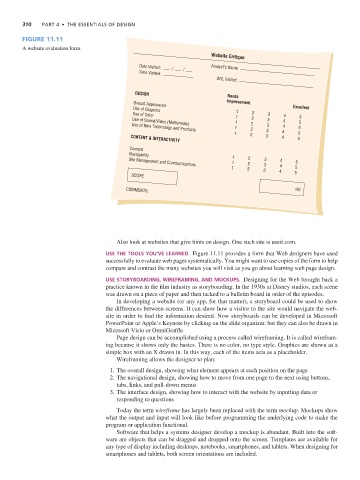
                Figure 11.11
                A website evaluation form.
                                                                               Website Critique
                                                       Date Visited:           Analyst’s Name
                                                       Time Visited:
                                                                                URL Visited

                                                     DESIGN
                                                                                    Needs
                                                                                    Improvement
                                                     Overall Appearance
                                                                                                          Excellent
                                                     Use of Graphics
                                                                                       1    2
                                                    Use of Color                                 3    4
                                                                                       1    2               5
                                                                                      1     2    3    4     5
                                                    Use of Sound/Video (Multimedia)
                                                                                      1     2    3    4    5
                                                    Use of New Technology and Products
                                                                                      1    2     3    4    5
                                                    CONTENT & INTERACTIVITY                      3    4    5
                                                    Content
                                                   Navigability
                                                                                     1     2    3
                                                                                     1     2    3    4    5
                                                   Site Management and Communications
                                                                                     1    2     3    4    5
                                                    SCORE                                            4    5
                                                  COMMENTS:                                               /40


                                               Also look at websites that give hints on design. One such site is useit.com.
                                            Use The Tools yoU’ve learned.  Figure 11.11 provides a form that Web designers have used
                                            successfully to evaluate web pages systematically. You might want to use copies of the form to help
                                            compare and contrast the many websites you will visit as you go about learning web page design.

                                            Use sToryboarding, WirefraMing, and MockUps.  Designing for the Web brought back a
                                            practice known in the film industry as storyboarding. In the 1930s at Disney studios, each scene
                                            was drawn on a piece of paper and then tacked to a bulletin board in order of the episodes.
                                               In developing a website (or any app, for that matter), a storyboard could be used to show
                                            the differences between screens. It can show how a visitor to the site would navigate the web-
                                            site in order to find the information desired. Now storyboards can be developed in Microsoft
                                            PowerPoint or Apple’s Keynote by clicking on the slide organizer, but they can also be drawn in
                                            Microsoft Visio or OmniGraffle.
                                               Page design can be accomplished using a process called wireframing. It is called wirefram-
                                            ing because it shows only the basics. There is no color, no type style. Graphics are shown as a
                                            simple box with an X drawn in. In this way, each of the items acts as a placeholder.
                                               Wireframing allows the designer to plan:
                                              1. The overall design, showing what element appears at each position on the page
                                              2. The navigational design, showing how to move from one page to the next using buttons,
                                               tabs, links, and pull-down menus
                                              3. The interface design, showing how to interact with the website by inputting data or
                                               responding to questions

                                               Today the term wireframe has largely been replaced with the term mockup. Mockups show
                                            what the output and input will look like before programming the underlying code to make the
                                            program or application functional.
                                               Software that helps a systems designer develop a mockup is abundant. Built into the soft-
                                            ware are objects that can be dragged and dropped onto the screen. Templates are available for
                                            any type of display including desktops, notebooks, smartphones, and tablets. When designing for
                                            smartphones and tablets, both screen orientations are included.

