


Page 389 -
P. 389
Chapter 9  Business Intelligence Systems
                388
                                               A presentation like that in Figure 9-17 is often called an OLAP cube, or sometimes simply a
                                            cube. The reason for this term is that some software products show these displays using three axes,
                                            like a cube in geometry. The origin of the term is unimportant here, however. Just know that an
                                            OLAP cube and an OLAP report are the same thing.
                                               The OLAP report in Figure 9-17 was generated by Microsoft SQL Server Analysis Services
                                            and is displayed in an Excel pivot table. The data was taken from a sample instructional database,
                                            called Food Mart, that is provided with SQL Server.
                                               It is possible to display OLAP cubes in many ways besides with Excel. Some third-party ven-
                                            dors provide more extensive graphical displays. For more information about such products, check
                                            for OLAP vendors and products at the Data Warehousing Review at http://dwreview.com/OLAP/
                                            index.html. For an example of a superb, easy-to-use OLAP tool, visit  www.TableauSoftware.com.
                                            Tableau has a liberal student-use policy as well.
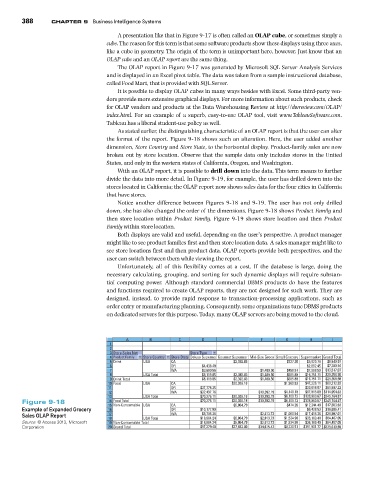
                                               As stated earlier, the distinguishing characteristic of an OLAP report is that the user can alter
                                            the format of the report. Figure 9-18 shows such an alteration. Here, the user added another
                                            dimension, Store Country and Store State, to the horizontal display. Product-family sales are now
                                            broken out by store location. Observe that the sample data only includes stores in the United
                                            States, and only in the western states of California, Oregon, and Washington.
                                               With an OLAP report, it is possible to drill down into the data. This term means to further
                                            divide the data into more detail. In Figure 9-19, for example, the user has drilled down into the
                                            stores located in California; the OLAP report now shows sales data for the four cities in California
                                            that have stores.
                                               Notice  another difference  between  Figures  9-18  and  9-19. The  user  has not only drilled
                                            down, she has also changed the order of the dimensions. Figure 9-18 shows Product Family and
                                            then  store location within  Product Family. Figure  9-19 shows store location and  then  Product
                                            Family within store location.
                                               Both displays are valid and useful, depending on the user’s perspective. A product manager
                                            might like to see product families first and then store location data. A sales manager might like to
                                            see store locations first and then product data. OLAP reports provide both perspectives, and the
                                            user can switch between them while viewing the report.
                                               Unfortunately, all of  this flexibility comes at a cost. If  the database is  large, doing  the
                                            necessary calculating, grouping, and sorting for such dynamic displays will require substan-
                                            tial  computing  power. Although standard commercial DBMS  products do  have  the features
                                            and functions required to create OLAP reports, they are not designed for such work. They are
                                            designed, instead,  to  provide rapid response  to  transaction-processing applications, such as
                                            order entry or manufacturing planning. Consequently, some organizations tune DBMS products
                                            on dedicated servers for this purpose. Today, many OLAP servers are being moved to the cloud.


                                                  A       B        C       D        E         F       G       H      I
                                             1
                                             2
                                             3  Store Sales Net        Store Type
                                             4  Product Family  Store Country  Store State Deluxe Superma Gourmet Supermar Mid-Size Groce Small Grocery Supermarket Grand Total
                                             5  Drink   USA      CA                  $2,392.83        $227.38  $5,920.76  $8,540.97
                                             6                   OR        $4,438.49                         $2,862.45  $7,300.94
                                             7                   WA        $3,680.56          $1,409.50  $458.51  $7,968.50  $13,517.07
                                             8          USA Total          $8,119.05  $2,392.83  $1,409.50  $685.89  $16,751.71  $29,358.98
                                             9  Drink Total                $8,119.05  $2,392.83  $1,409.50  $685.89  $16,751.71  $29,358.98
                                            10  Food    USA      CA                 $20,026.18        $1,960.53  $47,226.11  $69,212.82
                                            11                   OR       $37,778.35                        $23,818.87  $61,597.22
                                            12                   WA       $32,497.76         $10,392.19  $4,149.19  $67,915.69 $114,954.83
                                            13          USA Total         $70,276.11  $20,026.18  $10,392.19  $6,109.72  $138,960.67 $245,764.87
                Figure 9-18                 14  Food Total       CA       $70,276.11  $20,026.18  $10,392.19  $6,109.72  $138,960.67 $245,764.87
                                                                                                      $474.35
                                                                                     $5,064.79
                                                                                                            $12,344.49
                                                                                                                   $17,883.63
                                              Non-Consumable USA
                                            15
                Example of Expanded Grocery   16                 OR       $10,177.89                         $6,428.53  $16,606.41
                                                                           $8,706.36
                Sales OLAP Report           17          USA Total  WA     $18,884.24  $5,064.79  $2,813.73  $1,060.54  $17,416.38  $29,997.01
                                                                                                                   $64,487.05
                                                                                                            $36,189.40
                                            18
                                                                                              $2,813.73
                                                                                                      $1,534.90
                Source: © Access 2013, Microsoft   19  Non-Consumable Total  $18,884.24  $5,064.79  $2,813.73  $1,534.90  $36,189.40  $64,487.05
                Corporation                 20  Grand Total               $97,279.40  $27,483.80  $14,615.42  $8,330.51  $191,901.77 $339,610.90

