


Page 404 -
P. 404
Q9-8  What Are the Alternatives for Publishing BI?

                                                            Server      Report Type   Push Options  Skill Level Needed  403
                                                        Email or        Static       Manual        Low
                                                        collaboration tool
                                                        Web server      Static/Dynamic  Alert/RSS  Low for static
                                                                                                   High for dynamic
                                                        SharePoint      Static/Dynamic  Alert/RSS  Low for static
                                                                                     Workflow      High for dynamic

                                                        BI server       Dynamic      Alert/RSS     High
                    Figure 9-28                                                      Subscription
                    BI Publishing Alternatives


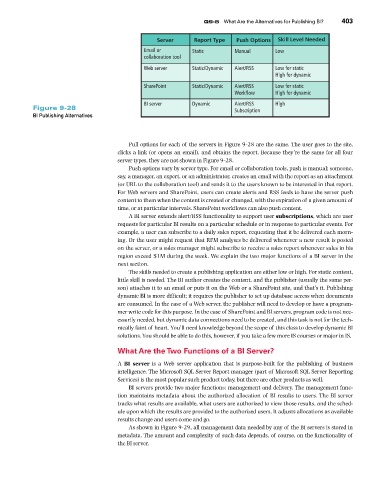
                                                   Pull options for each of the servers in Figure 9-28 are the same. The user goes to the site,
                                               clicks a link (or opens an email), and obtains the report. Because they’re the same for all four
                                               server types, they are not shown in Figure 9-28.
                                                   Push options vary by server type. For email or collaboration tools, push is manual; someone,
                                               say, a manager, an expert, or an administrator, creates an email with the report as an attachment
                                               (or URL to the collaboration tool) and sends it to the users known to be interested in that report.
                                               For Web servers and SharePoint, users can create alerts and RSS feeds to have the server push
                                               content to them when the content is created or changed, with the expiration of a given amount of
                                               time, or at particular intervals. SharePoint workflows can also push content.
                                                   A BI server extends alert/RSS functionality to support user subscriptions, which are user
                                               requests for particular BI results on a particular schedule or in response to particular events. For
                                               example, a user can subscribe to a daily sales report, requesting that it be delivered each morn-
                                               ing. Or the user might request that RFM analyses be delivered whenever a new result is posted
                                               on the server, or a sales manager might subscribe to receive a sales report whenever sales in his
                                               region exceed $1M during the week. We explain the two major functions of a BI server in the
                                               next section.
                                                   The skills needed to create a publishing application are either low or high. For static content,
                                               little skill is needed. The BI author creates the content, and the publisher (usually the same per-
                                               son) attaches it to an email or puts it on the Web or a SharePoint site, and that’s it. Publishing
                                               dynamic BI is more difficult; it requires the publisher to set up database access when documents
                                               are consumed. In the case of a Web server, the publisher will need to develop or have a program-
                                               mer write code for this purpose. In the case of SharePoint and BI servers, program code is not nec-
                                               essarily needed, but dynamic data connections need to be created, and this task is not for the tech-
                                               nically faint of heart. You’ll need knowledge beyond the scope of this class to develop dynamic BI
                                               solutions. You should be able to do this, however, if you take a few more IS courses or major in IS.

                                               What Are the Two Functions of a BI Server?
                                               A  BI server is a Web server application  that is  purpose-built for  the  publishing of  business
                                               intelligence. The Microsoft SQL Server Report manager (part of Microsoft SQL Server Reporting
                                               Services) is the most popular such product today, but there are other products as well.
                                                   BI servers provide two major functions: management and delivery. The management func-
                                               tion maintains metadata about the authorized allocation of BI results to users. The BI server
                                               tracks what results are available, what users are authorized to view those results, and the sched-
                                               ule upon which the results are provided to the authorized users. It adjusts allocations as available
                                               results change and users come and go.
                                                   As shown in Figure 9-29, all management data needed by any of the BI servers is stored in
                                               metadata. The amount and complexity of such data depends, of course, on the functionality of
                                               the BI server.

