


Page 202 - Basics of MATLAB and Beyond
P. 202
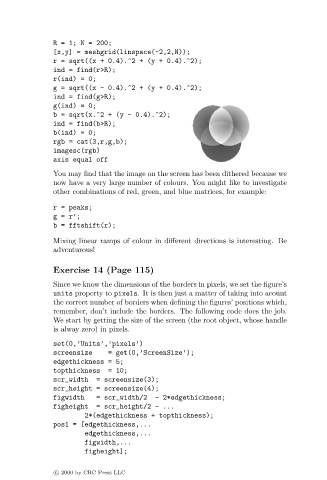
R = 1; N = 200;
                               [x,y] = meshgrid(linspace(-2,2,N));
                               r = sqrt((x + 0.4).^2 + (y + 0.4).^2);
                               ind = find(r>R);
                               r(ind) = 0;
                               g = sqrt((x - 0.4).^2 + (y + 0.4).^2);
                               ind = find(g>R);
                               g(ind) = 0;
                               b = sqrt(x.^2 + (y - 0.4).^2);
                               ind = find(b>R);
                               b(ind) = 0;
                               rgb = cat(3,r,g,b);
                               imagesc(rgb)
                               axis equal off
                               You may find that the image on the screen has been dithered because we
                               now have a very large number of colours. You might like to investigate
                               other combinations of red, green, and blue matrices, for example:

                               r = peaks;
                               g = r’;
                               b = fftshift(r);
                               Mixing linear ramps of colour in different directions is interesting. Be
                               adventurous!

                               Exercise 14 (Page 115)
                               Since we know the dimensions of the borders in pixels, we set the figure’s
                               units property to pixels. It is then just a matter of taking into acount
                               the correct number of borders when defining the figures’ positions which,
                               remember, don’t include the borders. The following code does the job.
                               We start by getting the size of the screen (the root object, whose handle
                               is alway zero) in pixels.
                               set(0,’Units’,’pixels’)
                               screensize     = get(0,’ScreenSize’);
                               edgethickness = 5;
                               topthickness   = 10;
                               scr_width  = screensize(3);
                               scr_height = screensize(4);
                               figwidth   = scr_width/2   - 2*edgethickness;
                               figheight  = scr_height/2 - ...
                                       2*(edgethickness + topthickness);
                               pos1 = [edgethickness,...
                                       edgethickness,...
                                       figwidth,...
                                       figheight];


                               c   2000 by CRC Press LLC

