


Page 125 - 02. Subyek Computer Aided Design - Beginner’s Guide to SOLIDWORKS 2019- Level 1 by Alejandro Reyes
P. 125
Part Modeling


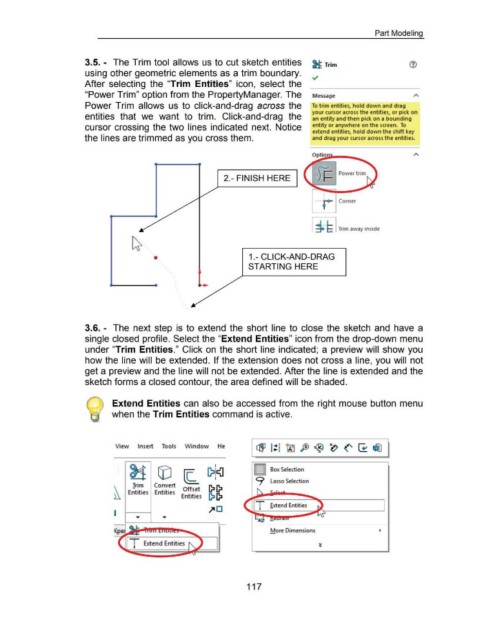
                                                      3.5. - The Trim tool  allows us to cut sketch entities                                                                                        ~ Trim


                                                      using other geometric elements as a trim boundary.
                                                                                                                                                                                                    ~
                                                      After  selecting  the  "Trim  Entities"  icon,  select  the


                                                      "Power Trim" option from the PropertyManager. The                                                                                             Message


                                                      Power Trim  allows  us to  click-and-drag  across the                                                                                         To trim entities, hold down and drag

                                                                                                                                                                                                    your cursor across the entities, or pick on
                                                      entities  that  we  want  to  trim.  Click-and-drag  the                                                                                      an entity and then pick on a bounding


                                                      cursor crossing  the two  lines indicated  next.  Notice                                                                                      entity or anywhere on the screen.  To
                                                                                                                                                                                                    extend entities, hold down the shift key

                                                      the lines are trimmed as you cross them.                                                                                                      and drag your cursor across the entities.


                                                                                                                                             2.- FINISH HERE


                                                                                                                                                                                                                     Corner


                                                                                                                                                                                                    I i. L I Trim away inside


                                                                                                 •                                                           1.- CLICK-AND-DRAG


                                                                                                                                                            STARTING HERE


                                                      3.6. - The  next step  is  to  extend  the  short line  to  close  the  sketch  and  have a


                                                      single closed profile. Select the "Extend Entities" icon from the drop-down menu


                                                      under "Trim  Entities." Click on  the short line  indicated;  a preview will  show you


                                                      how the line will  be extended.  If the extension does not cross a line, you will  not


                                                      get a preview and the line will not be extended. After the line is extended and the


                                                      sketch forms a closed contour, the area defined will be shaded.


                                                       @  Extend Entities can  also be accessed from the right mouse button menu


                                                                       when the Trim Entities command is active.


                                                                         View          Insert         Tools         Window               He


                                                                                                                                                                          More Dimensions


                                                                                                                                                           117

