


Page 700 - 02. Subyek Computer Aided Design - Beginner’s Guide to SOLIDWORKS 2019- Level 1 by Alejandro Reyes
P. 700
Beginner's Guide to SOLIDWORKS 2019- Level I


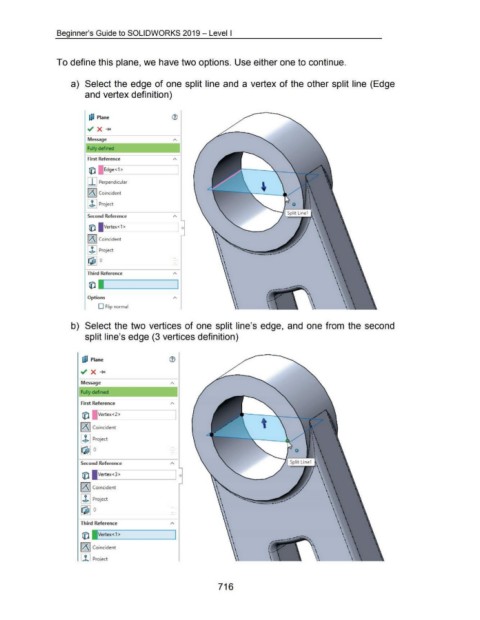
                                    To define this plane, we have two options. Use either one to continue.


                                             a)  Select the edge of one split line and a vertex of the other split line (Edge


                                                      and vertex definition)


                                                        LiJ  Plane                                          (i)


                                                       ~ X -+c


                                                        Message

                                                        Fully defined


                                                        First Reference                                      A


                                                        rjjJ  [ 1Edge<1>


                                                       I I I Perpendicular


                                                       l/\1 Coincident


                                                       I .b I Project


                                                        Second Reference

                                                        r:o.      Vertex<l >


                                                       I/\ I Coincident


                                                       I .b I Project

                                                       !Qj!] o


                                                       Third Reference                                       A


                                                        r:o. l


                                                        Options

                                                              D Flip normal


                                             b)  Select the two vertices of one split line's edge, and  one from  the  second


                                                      split line's edge (3 vertices definition)


                                                    IJ;J  Plane                                            ®


                                                   ~ X _..


                                                   Message                                                  A


                                                   Fully defined


                                                    First Reference                                         A


                                                    fil      IVertex<2>
                                                                                                                                                                    t


                                                   II\ I Coincident


                                                   I J. I Project

                                                   ~ 0


                                                   Second  Reference


                                                    fi) F       ertex<3>


                                                   ll\1 Coincident


                                                   I J. I Project

                                                   ~ 0


                                                   Third Reference                                          A


                                                    fi) L. Vertex< 1 >


                                                   II\ I Coincident


                                                   I ,t I Proiect


                                                                                                                                         716

