


Page 703 - 02. Subyek Computer Aided Design - Beginner’s Guide to SOLIDWORKS 2019- Level 1 by Alejandro Reyes
P. 703
Beginner's Guide to SOLIDWORKS 2019- Level I
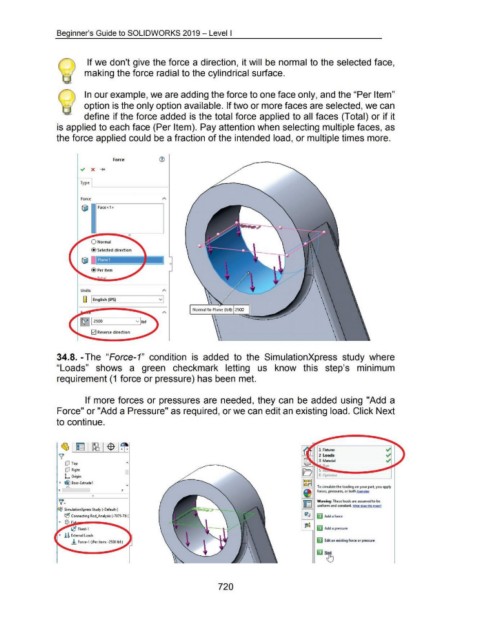
If we don't give the force a direction, it will be normal to the selected face,
making the force radial to the cylindrical surface.
In our example, we are adding the force to one face only, and the "Per Item"
option is the only option available. If two or more faces are selected, we can
define if the force added is the total force applied to all faces (Total) or if it
is applied to each face (Per Item). Pay attention when selecting multiple faces, as
the force applied could be a fraction of the intended load, or multiple times more.
Force (1)
Type
Force
Units \
•
•
(] English (IPS) v •
' •
\
•
•
Normal to Plane (lbf): 2500 \ •
•
' .
•
\
\
•
•
.
0 Reverse direction \ .
\ .
34.8. -The "Force-1" condition is added to the SimulationXpress study where
"Loads" shows a green checkmark letting us know this step's minimum
requirement (1 force or pressure) has been met.
If more forces or pressures are needed, they can be added using "Add a
Force" or "Add a Pressure" as required, or we can edit an existing load. Click Next
to continue.
~ 1 ~ 1 ~ 1 $ 1~
Y'
CP Top ~
CP Right
L Origin 5 Opt miZe
~~~
~ ~ Boss-Extrude 1
"" 1------1 To simulate the loading on your part, you apply
< > forces, pressures, or both.Examp!es
C)
~ Warning: These loads are assumed to be
e=J uniform and constant. What does this me1n?
~ SimulationXpress Study (-Default-)
~ Connecting Rod_Analysis (-7075-T6 ( r;Q ~ Add a force
~ C5' F
(,C Fixed-1 L--~--, ~ Add a pressure
~ ! & External Loads
.!. Force-1 (:Per item: -2500 lbf:) ~ Edit an existing force or pressure
720

