


Page 705 - 02. Subyek Computer Aided Design - Beginner’s Guide to SOLIDWORKS 2019- Level 1 by Alejandro Reyes
P. 705
Beginner's Guide to SOLIDWORKS 2019- Level I


                                              )  For larger, more complex models there would be a noticeable difference in


                                                     computing time. SOLIDWORKS Simulation Professional offers many more


                                                     options  and  the  ability  to  analyze  entire  assemblies;  with  multiple


                                    components, a smaller mesh size will most definitively impact the solution time.


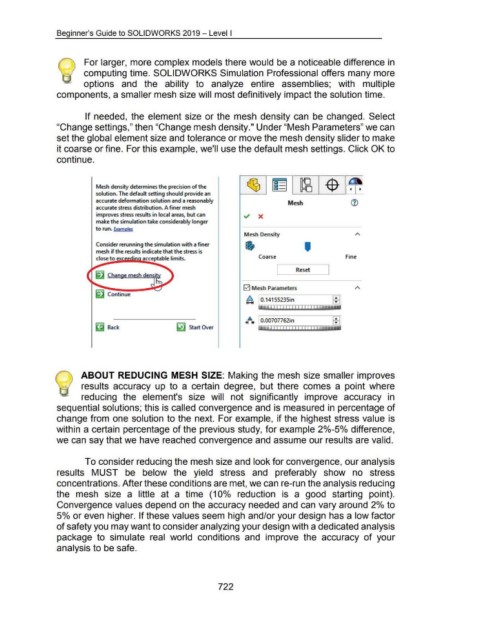
                                                      If needed, the element size or the  mesh  density can  be  changed.  Select


                                    "Change settings," then "Change mesh density." Under "Mesh Parameters" we can


                                    set the global element size and tolerance or move the mesh density slider to make


                                    it coarse or fine. For this example, we'll use the default mesh settings. Click OK to


                                    continue.


                                                             Mesh density determines the precision of the

                                                             solution. The default setting should provide an

                                                             accurate deformation solution and a reasonably
                                                                                                                                                                                     Mesh
                                                             accurate stress distribution. A finer mesh

                                                             improves stress results in local areas, but can                                             ~  X

                                                             make the simulation take considerably longer

                                                             to run. Examples
                                                                                                                                                          Mesh Density


                                                             Consider rerunning the simulation with a finer
                                                             mesh if the results indicate that the stress is                                                                                   '

                                                             close to                                                                                              Coarse                                                Fine

                                                                                                                                                                              L           Reset  ~


                                                                                                                                                         0  Mesh Parameters
                                                             ~ Continue
                                                                                                                                                           ~ 0.14155235in


                                                                                                                                                            4
                                                                                                                                                          <tJ. .,.  0.00707762in
                                                                    Back                                        ~ Start Over                                                                I""''""'"""''""T'r.~~


                                                    ABOUT REDUCING  MESH  SIZE:  Making the mesh size smaller improves


                                                    results  accuracy  up  to  a  certain  degree,  but  there  comes  a  point  where


                                                    reducing  the  element's  size  will  not  significantly  improve  accuracy  in


                                    sequential solutions; this is called convergence and is measured in percentage of


                                    change from  one solution to the next.  For example, if the highest stress value is


                                    within a certain percentage of the previous study, for example 2°/o-5°/o difference,


                                    we can say that we have reached convergence and assume our results are valid.


                                                      To consider reducing the mesh size and look for convergence, our analysis


                                    results  MUST  be  below  the  yield  stress  and  preferably  show  no  stress


                                    concentrations. After these conditions are met, we can re-run the analysis reducing


                                    the  mesh  size  a  little  at  a  time  (1 0°/o  reduction  is  a  good  starting  point).


                                    Convergence values depend on the accuracy needed and can vary around 2°/o to


                                    5°/o or even higher. If these values seem high and/or your design has a low factor


                                    of safety you may want to consider analyzing your design with a dedicated analysis


                                    package  to  simulate  real  world  conditions  and  improve  the  accuracy  of  your


                                    analysis to be safe.


                                                                                                                                         722

