


Page 701 - 02. Subyek Computer Aided Design - Beginner’s Guide to SOLIDWORKS 2019- Level 1 by Alejandro Reyes
P. 701
Analysis: SimulationXpress
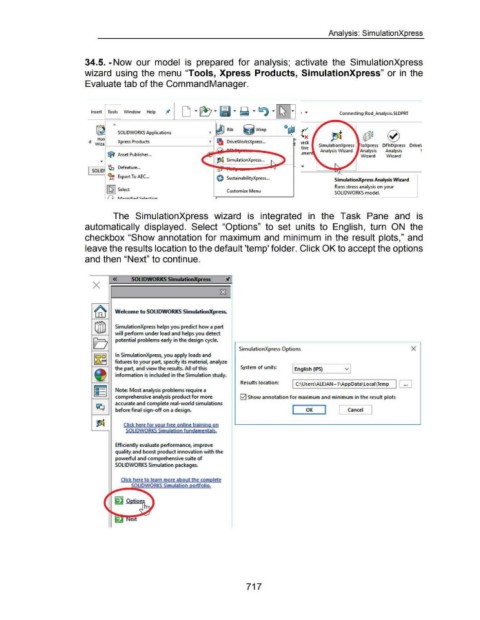
34.5. -Now our model is prepared for analysis; activate the SimulationXpress
wizard using the menu "Tools, Xpress Products, SimulationXpress" or in the
Evaluate tab of the Command Manager.
Insert Tools I Window Help Connecting Rod_Analysis.SLDPRT
Qd;l - ~
Rib ij w rap
SOLIDWORKS Applications ~
I ~ :0* 0
Hoi ' '
d Wiza ' Xpress Products ~ Ill DriveWorksXpress ... !t teck SimulationXpress loXpress DFMXpress Drive\/
tive
~ Asset Publisher ... umen Analysis Wizard Analysis Analysis '
Wizard
Wizard
...
r----1 ~ Defeature ...
SOLID
~'ft Export To AEC ... ~) SustainabilityXpre.ss ...
SimulationXpress Analysis Wizard
Runs stress analysis on your
[liJ Select
l.-- Customize Menu SOLIDWORKS model.
(J r..A~nnif'io.,_. <:_alortinn
The SimulationXpress wizard is integrated in the Task Pane and is
automatically displayed. Select "Options" to set units to English, turn ON the
checkbox "Show annotation for maximum and minimum in the result plots," and
leave the results location to the default 'temp' folder. Click OK to accept the options
and then "Next" to continue.
« SOLIDWORKS SimuiMionXpress
X
Wekome to SOLIDWORKS SimulationXpress.
SimulationXpress helps you predict how a part
will perform under load and helps you detect
potential problems early in the design cycle.
SimulationXpress Options X
In SimulationXpre. ss, you apply loads and
fixtures to your part, specify its material, analyze
the part, and view the results. All of this System of units: English (IPS) v
information is included in the Simulation study.
Results location: I C:\Users\ALEJAN-1\AppData\Locai\Temp ...
Note: Most analysis problems require a
comprehensive analysis product for more 0 Show annotation for maximum and minimum in the result plots
accurate and complete real-world simulations
before final sign-off on a design. I OK I l Cancel J
Click here for your free online training on
SOLIDWORKS Simulation fundamentals.
Efficiently evaluate performance, improve
quality and boost product innovation with the
powerful and comprehensive suite of
SOLIDWORKS Simulation packages.
Click here to learn more about the complete
~ .... ..-soiiUDWORKS Simulation ortfolio.
717

