Page 704 - 02. Subyek Computer Aided Design - Beginner’s Guide to SOLIDWORKS 2019- Level 1 by Alejandro Reyes
P. 704
Analysis:  SimulationXpress


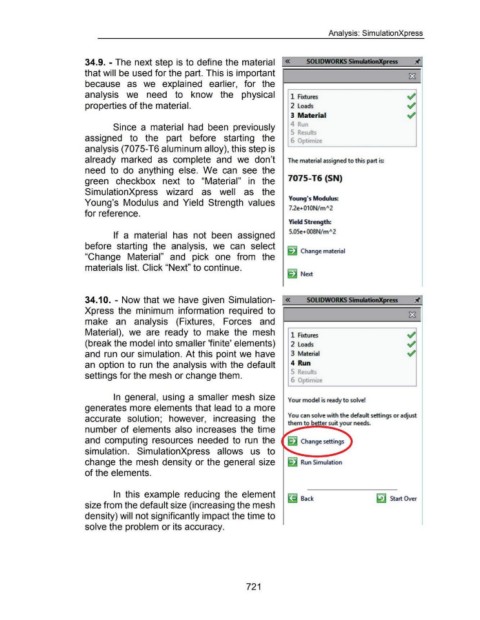
                                                      34.9. - The next step is to define the material  ';:«==so=L=Io=w=o=R:::;;:;KS~Si=·m=u=ll•=ti-=o.-=.xpr==ess==Jti~


                                                      that will be used for the part. This is important                                                                                                                                                          ~


                                                      because  as  we  explained  earlier,  for  the


                                                      analysis  we  need  to  know  the  physical                                                                                      1  Fixtures


                                                      properties of the material.                                                                                                      2  Loads


                                                                                                                                                                                       3  Material

                                                                                                                                                                                      4  ...
                                                                        Since  a  material  had  been  previously

                                                                                                                                                                                       5  Results
                                                      assigned  to  the  part  before  starting  the                                                                                   6  Opt1m1ze


                                                      analysis (7075-T6 aluminum alloy), this step is


                                                      already  marked  as  complete  and  we  don't                                                                                  The material assigned to this part is:


                                                      need  to  do  anything  else.  We  can  see  the


                                                      green  checkbox  next  to  "Material"  in  the                                                                                 7075-T6 {SN)


                                                      SimulationXpress  wizard  as  well  as  the

                                                                                                                                                                                      Young's Modulus:
                                                      Young's  Modulus  and  Yield  Strength  values
                                                                                                                                                                                      7.2e+010N/ mA2
                                                      for reference.


                                                                                                                                                                                      Yield Strength:


                                                                                                                                                                                      5.05e+008N/ mA2
                                                                        If  a  material  has  not  been  assigned


                                                      before  starting  the  analysis,  we  can  select
                                                                                                                                                                                     ~ Change material
                                                      "Change  Material"  and  pick  one  from  the


                                                      materials list. Click "Next" to continue.

                                                                                                                                                                                     c"  Next


                                                      34.1 0.  - Now that we have  given  Simulation- «                                                                                          souowoRKS SimulmonXpress
                                                      Xpress  the  minimum  information  required  to  =;:::::=============~


                                                      make  an  analysis  (Fixtures,  Forces  and


                                                      Material),  we  are  ready  to  make  the  mesh  r 1  Fixtures


                                                      (break the model into smaller 'finite' elements)                                                                                 2  Loads


                                                      and  run our simulation. At this point we  have                                                                                  3  Material


                                                      an  option to  run  the  analysis with  the default                                                                              4  Run


                                                      settings for the mesh or change them.
                                                                                                                                                                                       6  Opt1m ze


                                                                        In  general,  using  a  smaller mesh  size                                                                   Your model is ready to solve!


                                                      generates more elements that lead to a more


                                                                                                                                                                                     You can solve with the default settings or adjust
                                                      accurate  solution;  however,  increasing  the
                                                                                                                                                                                     them to better suit your needs.

                                                      number of elements  also  increases  the  time


                                                      and  computing  resources  needed  to  run  the


                                                      simulation.  SimulationXpress  allows  us  to


                                                      change the  mesh density or the general  size                                                                                          Run Simulation


                                                      of the elements.


                                                                        In  this  example  reducing  the  element                                                                    ~ Back
                                                                                                                                                                                                                                            lil Start Over
                                                      size from the default size (increasing the mesh


                                                      density) will not significantly impact the time to


                                                      solve the problem or its accuracy.


                                                                                                                                                           721
   699   700   701   702   703   704   705   706   707   708   709