


Page 706 - 02. Subyek Computer Aided Design - Beginner’s Guide to SOLIDWORKS 2019- Level 1 by Alejandro Reyes
P. 706
Analysis: SimulationXpress


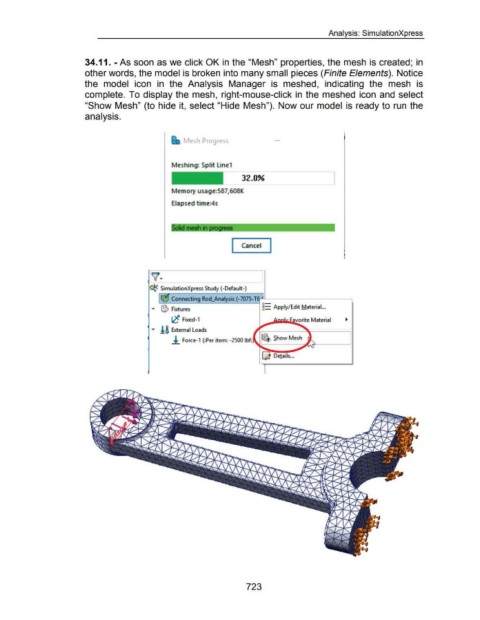
                                                      34.11. - As soon as we click OK in the "Mesh" properties, the mesh is created;  in


                                                      other words, the model is broken into many small pieces (Finite Elements).  Notice


                                                      the  model  icon  in  the  Analysis  Manager  is  meshed,  indicating  the  mesh  is


                                                      complete.  To display the  mesh,  right-mouse-click in  the  meshed icon and  select


                                                      "Show Mesh" (to hide it,  select "Hide  Mesh").  Now our model  is  ready to  run  the


                                                      analysis.


                                                                                                                    Mesh Progress


                                                                                                            Meshing: Split Line1


                                                                                                                                                        32.0%


                                                                                                            Memory usage:587,608K


                                                                                                            Elapsed time:4s


                                                                                                            Sold mesh in             t   •  •   •• - -


                                                                                                                                                  I Cancel  I


                                                                                                                                                               J


                                                                                              '* SimulationXpress Study (-Default-)


                                                                                                            Connecting Rod_Analysis ( -7075-T6:---........_------------,

                                                                                                ...  1$ Fixtures                                                     g:: Apply/Edit Material...


                                                                                                            t,C  Fixed-1


                                                                                                ""'  !& External Loads


                                                                                                            .!. Force-1  (:Per item: -2500 lbf:


                                                                                                                                                                     ~ De!ails ...


                                                                                                                                                           723

