


Page 711 - 02. Subyek Computer Aided Design - Beginner’s Guide to SOLIDWORKS 2019- Level 1 by Alejandro Reyes
P. 711
Beginner's Guide to SOLIDWORKS 2019- Level I
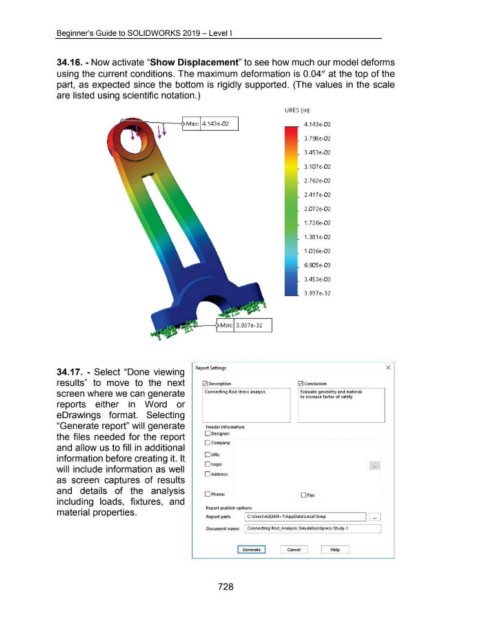
34.16. - Now activate "Show Displacement" to see how much our model deforms
using the current conditions. The maximum deformation is 0.04" at the top of the
part, as expected since the bottom is rigidly supported. (The values in the scale
are listed using scientific notation.)
URES (in)
4.143e-0 2
3. 7SE!e-0 2
3.453e-0 2
3.107e-0 2
2. 762e-0 2
2.417e-0 2
2.072e-0 2
1.726e-0 2
1.381 e-0 2
1.036e-0 2
6.9J5e-0 3
3.453e-0 3
3.937e- 32
Report Settings X
34.17. - Select "Done viewing
resu Its" to move to the next ~ Description ~Conclusion
screen where we can generate Connecting Rod stress analysis Evaluate geometry and material
to increase factor of safety
reports either in Word or
eDrawings format. Selecting
"Generate report" will generate Header information
the files needed for the report D Designer:
Dcompany:
and allow us to fill in additional
0URl:
information before creating it. It
Ologo: ...
will include information as well
0Address:
as screen captures of results
and details of the analysis
0Phone: 0Fax:
including loads, fixtures, and
Report publish options
material properties. Report path: .--I C:-·\U-se-rs\A_l_EJ-AN---1\A-p-pD-at-a\l-oc-ai\-Te-mp-------,~ ~
Document name: Connecting Rod_Analysis-SimulationXpress Study-1
I Generate I Cancel [ Help J
728

