


Page 707 - 02. Subyek Computer Aided Design - Beginner’s Guide to SOLIDWORKS 2019- Level 1 by Alejandro Reyes
P. 707
Beginner's Guide to SOLIDWORKS 2019- Level I


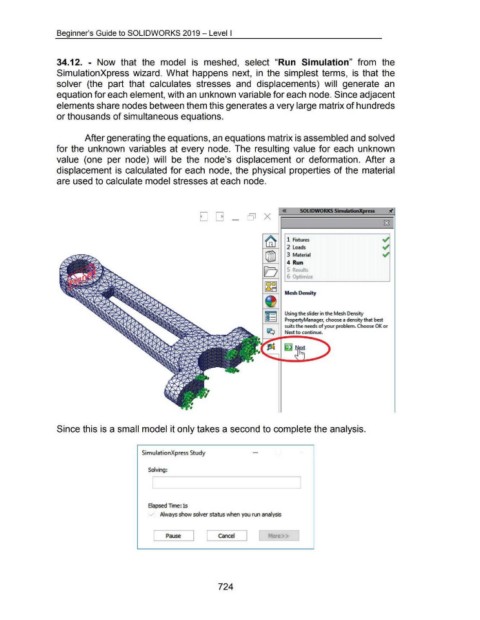
                                    34.12.  - Now  that  the  model  is  meshed,  select  "Run  Simulation"  from  the


                                    SimulationXpress wizard.  What happens  next,  in  the  simplest terms,  is  that the


                                    solver  (the  part  that  calculates  stresses  and  displacements)  will  generate  an


                                    equation for each element, with an unknown variable for each node. Since adjacent


                                    elements share nodes between them this generates a very large matrix of hundreds


                                    or thousands of simultaneous equations.


                                                      After generating the equations, an equations matrix is assembled and solved


                                    for the  unknown  variables at every node.  The  resulting  value for each  unknown


                                    value  (one  per  node)  will  be  the  node's  displacement  or  deformation.  After  a


                                    displacement is  calculated for each  node, the  physical  properties of the  material


                                    are used to calculate model stresses at each node.


                                                                                                                                                                                 «           SOLIDWORKS Simulmon)(press
                                                                                                                              D[] _ OJ X


                                                                                                                                                                       ~                                                                        ~
                                                                                                                                                                                    1  Fixtures

                                                                                                                                                                                     2  Loads                                                   ~
                                                                                                                                                                       ®J            3  Material                                                ~


                                                                                                                                                                                    4  Run
                                                                                                                                                                      [0             J    o  u Its


                                                                                                                                                                                     6  Opt1m1ze
                                                                                                                                                                       llS~


                                                                                                                                                                                   Mesh Density


                                                                                                                                                                                   Using the slider in the Mesh Density
                                                                                                                                                                                   PropertyManager, choose a density that best

                                                                                                                                                                                   suits the needs of your problem. Choose OK or
                                                                                                                                                                        I;C;J      Next to continue.


                                    Since this is a small model it only takes a second to complete the analysis.


                                                                                          SimulationXpress Study


                                                                                              Solving:


                                                                                              Elapsed Time: 1s

                                                                                                     Always show solver status when you run analysis


                                                                                                         Pause  J  [  Cancel  J
                                                                                                 [                                                                       More>>


                                                                                                                                         724

