


Page 712 - 02. Subyek Computer Aided Design - Beginner’s Guide to SOLIDWORKS 2019- Level 1 by Alejandro Reyes
P. 712
Analysis: SimulationXpress
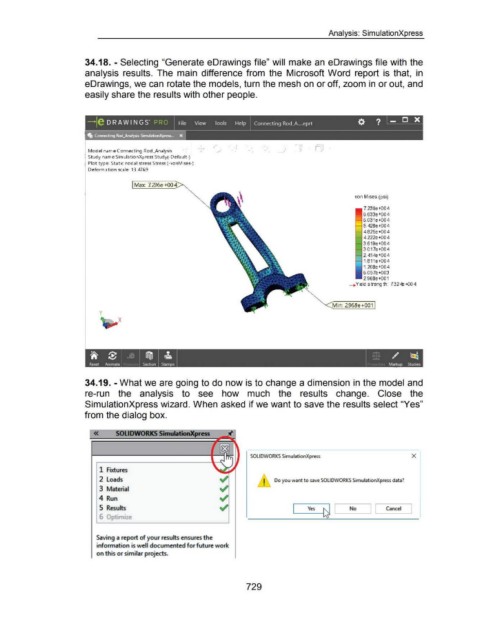
34.18. - Selecting "Generate eDrawings file" will make an eDrawings file with the
analysis results. The main difference from the Microsoft Word report is that, in
eDrawings, we can rotate the models, turn the mesh on or off, zoom in or out, and
easily share the results with other people.
, OJ ,
_)
Model nam e:Connecting Rod_Analysis •
Study nam e:Sim ulationXpress Study(-Default-)
Plot type: Static nodal stress Stress (-vonMises-)
Deforma tion scale: 13.4769
Max: 7. 236e +00
von Mises (psi)
7.236e+004
6.633e+004
6.031e+004
5. 428e+004
4.825e+004
4.222e+004
3.619e+004
3.017e+004
2. 414e+004
1.811e+004
1.208e+004
6.057e+003
2.968e+001
~Yield s trength: 7 32 te -+{)0 4
Min: 2968e +001
y
X
I j_ ~'· ~
if ~ I _IO I ijj I ~ I
Reset Animate I Section Stamps Markup Studies
34.19. - What we are going to do now is to change a dimension in the model and
re-run the analysis to see how much the results change. Close the
SimulationXpress wizard. When asked if we want to save the results select "Yes"
from the dialog box.
« SOLIDWORKS SimulationXpress
SOLIDWORKS SimulationXpress X
1 Fixtures
2 Loads ~ I Do you want to save SOLIDWORKS SimulationXpress data?
3 Material ~ •
4 Run ~
5 Results ~ Yes ~ _ No J [ Cancel J
(, '"'I"' L
Saving a report of your results ensures the
information is well documented for future work
on this or similar projects. I
729

