


Page 708 - 02. Subyek Computer Aided Design - Beginner’s Guide to SOLIDWORKS 2019- Level 1 by Alejandro Reyes
P. 708
Analysis: SimulationXpress
When the solver is finished with the calculations, we see an animation of
the deformed model.
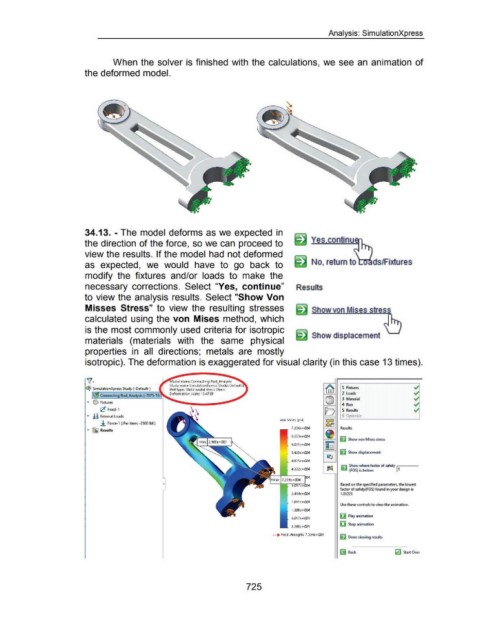
34.13. - The model deforms as we expected in
the direction of the force, so we can proceed to
view the results. If the model had not deformed
as expected, we would have to go back to No, return to ds/Fixtures
modify the fixtures and/or loads to make the
necessary corrections. Select "Yes, continue" Results
to view the analysis results. Select "Show Von
Misses Stress" to view the resulting stresses
calculated using the von Mises method, which
is the most commonly used criteria for isotropic
Show displacement
materials (materials with the same physical
properties in all directions; metals are mostly
isotropic). The deformation is exaggerated for visual clarity (in this case 13 times).
~. odel name:Connecting Rod_Analysis
Study name:SimulationXpress Study[-Default-)
qt SimulationXpress Study (·Default-) Plot type: Static nodal stress Stress 1 Fixtures ~
Deformation scale: 13.4769 2 Loads ~
Connecting Rod_Analysis ( -707S-T6
3 Material y?
... ~ Fixtures
4 Run ~
rC Fixed-1 5 Results y?
... !! External Loads
.!. Force-1 (:Per item: -2SOO lbf:)
• ~ Results Results
~ Show von Mises stress
~ Show displacement
~ Show where factor of safety I
..,. (FOS) is below: 1
0 Based on the specified parameters, the lowest
factor of safety(FOS) found in your design is
2.414e+004 1.01221
1.811 e+004
Use these controls to view the animation.
1.200e+004
ij Play animation
6.057e+003
iJ Stop animation
2.968e+001
__., Yield strength: 7.324e+004
~ Done viewing results
~ Back ~ Start Over
725

