


Page 710 - 02. Subyek Computer Aided Design - Beginner’s Guide to SOLIDWORKS 2019- Level 1 by Alejandro Reyes
P. 710
Analysis: SimulationXpress
The different values for Factor of Safety (FOS) mean:
Value Meaning
The stress at this location in the part is less than the yield
> 1 strength and is therefore safe. Depending on the specific
application, we may have to design with a higher FOS to ensure
our design is safe and have room for unexpected loads.
The stress at this location in the part is exactly the yield strength.
= 1 This part has started or is about to yield (deform plastically) and
will most likely fail if the forces acting on the model are slightly
more than the forces used in the analysis.
The stress at this location in the part has exceeded the yield
strength of the material and the component will fail with the
< 1
analysis parameters used, either deforming plastically or
breakin .
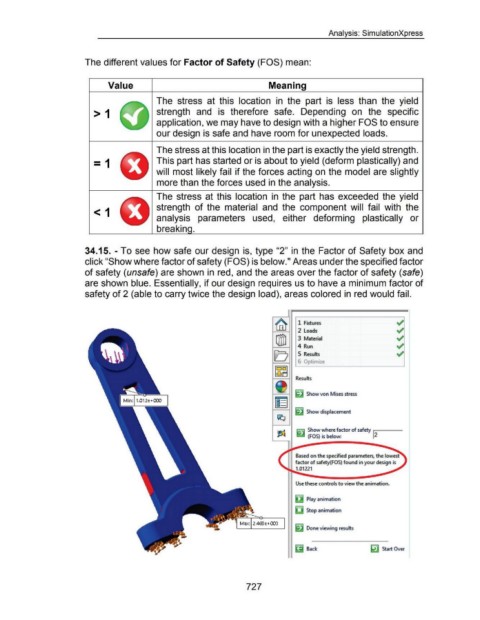
34.15. - To see how safe our design is, type "2" in the Factor of Safety box and
click "Show where factor of safety (FOS) is below." Areas under the specified factor
of safety (unsafe) are shown in red, and the areas over the factor of safety (safe)
are shown blue. Essentially, if our design requires us to have a minimum factor of
safety of 2 (able to carry twice the design load), areas colored in red would fail.
I r .
~ ~
1 FIXtures
2 loads ~
[jjjJ 3 Material ~
4 Run ~
El 5 Results ~
I •
~~~
Results
~
~ Show von Mises stress
[§
~ Show displacement
I;Q
~ ~ Show where factor of safety J
2
(FOS) is below:
l I"" Based on the specified parameters, the lowest
/
factor of safety(FOS) found in your design is t
~ 1.01221
Use these controls to view the animation.
~ Play animation
lj Stop animation
~ Done viewing results
~ Back ~ Start Over
727

