


Page 368 - Between One and Many The Art and Science of Public Speaking
P. 368
Chapter 12 Using Media in Your Speech                335


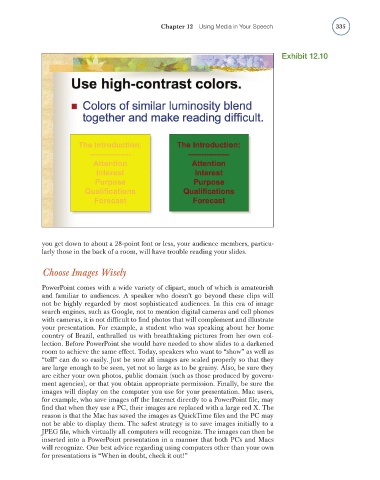
                                                                                            Exhibit 12.10


                    you get down to about a 28-point font or less, your audience members, particu-
                    larly those in the back of a room, will have trouble reading your slides.


                    Choose Images Wisely

                    PowerPoint comes with a wide variety of clipart, much of which is amateurish
                    and familiar to audiences. A speaker who doesn’t go beyond these clips will
                    not be highly regarded by most sophisticated audiences. In this era of image
                    search engines, such as Google, not to mention digital cameras and cell phones
                    with cameras, it is not diffi cult to fi nd photos that will complement and illustrate
                    your presentation. For example, a student who was speaking about her home
                    country of Brazil, enthralled us with breathtaking pictures from her own col-
                    lection. Before PowerPoint she would have needed to show slides to a darkened
                    room to achieve the same effect. Today, speakers who want to “show” as well as
                    “tell” can do so easily. Just be sure all images are scaled properly so that they
                    are large enough to be seen, yet not so large as to be grainy. Also, be sure they
                    are either your own photos, public domain (such as those produced by govern-
                    ment agencies), or that you obtain appropriate permission. Finally, be sure the
                    images will display on the computer you use for your presentation. Mac users,
                    for example, who save images off the Internet directly to a PowerPoint fi le, may
                    fi nd that when they use a PC, their images are replaced with a large red X. The
                    reason is that the Mac has saved the images as QuickTime fi les and the PC may
                    not be able to display them. The safest strategy is to save images initially to a
                    JPEG fi le, which virtually all computers will recognize. The images can then be
                    inserted into a PowerPoint presentation in a manner that both PCs and Macs
                    will recognize. Our best advice regarding using computers other than your own
                    for presentations is “When in doubt, check it out!”

