


Page 242 - Make Your Own PCBs with EAGLE from Schematic Designs to Finished Boards
P. 242
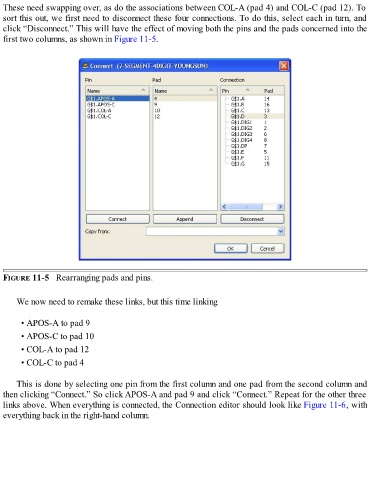
These need swapping over, as do the associations between COL-A (pad 4) and COL-C (pad 12). To
  sort this out, we first need to disconnect these four connections. To do this, select each in turn, and
  click “Disconnect.” This will have the effect of moving both the pins and the pads concerned into the
  first two columns, as shown in Figure 11-5.


  FIGURE 11-5   Rearranging pads and pins.


      We now need to remake these links, but this time linking


        • APOS-A to pad 9

        • APOS-C to pad 10
        • COL-A to pad 12

        • COL-C to pad 4


      This is done by selecting one pin from the first column and one pad from the second column and

  then clicking “Connect.” So click APOS-A and pad 9 and click “Connect.” Repeat for the other three
  links above. When everything is connected, the Connection editor should look like Figure 11-6, with
  everything back in the right-hand column.

