


Page 209 - Mastering SolidWorks
P. 209
|
        178   CHAPTER 5  Using VisUalization techniqUes


                    TIP  Using the tangent edges as phantom setting is a quick and easy way to look at a model to
                       determine whether face transitions are tangent. it does not help to distinguish between tangency
                       and curvature continuity; you need to use zebra stripes for that.

                      23.  Switch back to Shaded display.
                      24.  If you do not have a RealView-capable computer, skip this step. Ensure that the RealView
                          button in the View toolbar is depressed. Click the Appearances/Scenes tab on the Task
                          pane to the right of the graphics window. Expand Appearances ➢ Metal ➢ Steel; in the
                          lower pane, scroll down to the Cast Carbon Steel appearance.
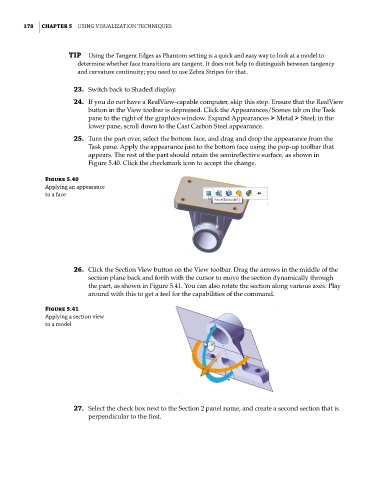
                      25.  Turn the part over, select the bottom face, and drag and drop the appearance from the
                          Task pane. Apply the appearance just to the bottom face using the pop-up toolbar that
                          appears. The rest of the part should retain the semireflective surface, as shown in
                          Figure 5.40. Click the checkmark icon to accept the change.
              Figure 5.40
              applying an appearance
              to a face


                      26.  Click the Section View button on the View toolbar. Drag the arrows in the middle of the
                          section plane back and forth with the cursor to move the section dynamically through
                          the part, as shown in Figure 5.41. You can also rotate the section along various axes. Play
                          around with this to get a feel for the capabilities of the command.

              Figure 5.41
              applying a section view
              to a model


                      27.  Select the check box next to the Section 2 panel name, and create a second section that is
                          perpendicular to the first.

