


Page 222 - Mastering SolidWorks
P. 222
|
                                                                              uSinG Sketch PictureS    193


                    Creating a Derived Sketch
                    A derived sketch is a parametrically linked copy. The original parent and derived sketches do not
                    need to have any geometrical relation to one another, but when the parent sketch is changed, the
                    dependent derived copy is updated to stay in sync.
                       To create a derived sketch, you can select a plane or planar face, Ctrl+select the sketch you
                    want to copy, and then choose Insert ➢ Derived Sketch.
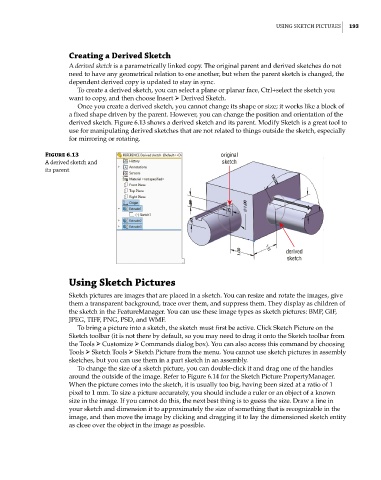
                       Once you create a derived sketch, you cannot change its shape or size; it works like a block of
                    a fixed shape driven by the parent. However, you can change the position and orientation of the
                    derived sketch. Figure 6.13 shows a derived sketch and its parent. Modify Sketch is a great tool to
                    use for manipulating derived sketches that are not related to things outside the sketch, especially
                    for mirroring or rotating.

              Figure 6.13                                     original
              a derived sketch and                             sketch
              its parent


                                                                                 derived
                                                                                 sketch


                    Using Sketch Pictures
                    Sketch pictures are images that are placed in a sketch. You can resize and rotate the images, give
                    them a transparent background, trace over them, and suppress them. They display as children of
                    the sketch in the FeatureManager. You can use these image types as sketch pictures: BMP, GIF,
                    JPEG, TIFF, PNG, PSD, and WMF.
                       To bring a picture into a sketch, the sketch must first be active. Click Sketch Picture on the
                    Sketch toolbar (it is not there by default, so you may need to drag it onto the Sketch toolbar from
                    the Tools ➢ Customize ➢ Commands dialog box). You can also access this command by choosing
                    Tools ➢ Sketch Tools ➢ Sketch Picture from the menu. You cannot use sketch pictures in assembly
                    sketches, but you can use them in a part sketch in an assembly.
                       To change the size of a sketch picture, you can double-click it and drag one of the handles
                    around the outside of the image. Refer to Figure 6.14 for the Sketch Picture PropertyManager.
                    When the picture comes into the sketch, it is usually too big, having been sized at a ratio of 1
                    pixel to 1 mm. To size a picture accurately, you should include a ruler or an object of a known
                    size in the image. If you cannot do this, the next best thing is to guess the size. Draw a line in
                    your sketch and dimension it to approximately the size of something that is recognizable in the
                    image, and then move the image by clicking and dragging it to lay the dimensioned sketch entity
                    as close over the object in the image as possible.

