


Page 363 - Mastering SolidWorks
P. 363
|
                                                              Controlling iteMs With Configurations    337


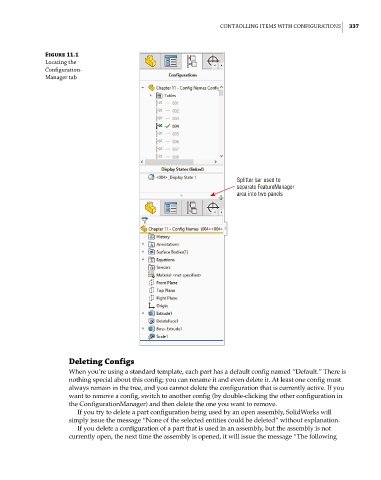
              Figure 11.1
              locating the
              Configuration -
              Manager tab


                                                                   Splitter bar used to
                                                                   separate FeatureManager
                                                                   area into two panels


                    Deleting Configs
                    When you’re using a standard template, each part has a default config named “Default.” There is
                    nothing special about this config; you can rename it and even delete it. At least one config must
                    always remain in the tree, and you cannot delete the configuration that is currently active. If you
                    want to remove a config, switch to another config (by double-clicking the other configuration in
                    the ConfigurationManager) and then delete the one you want to remove.
                       If you try to delete a part configuration being used by an open assembly, SolidWorks will
                    simply issue the message “None of the selected entities could be deleted” without explanation.
                       If you delete a configuration of a part that is used in an assembly, but the assembly is not
                    currently open, the next time the assembly is opened, it will issue the message “The following

