


Page 313 - Numerical Analysis Using MATLAB and Excel
P. 313
Interpolation with MATLAB


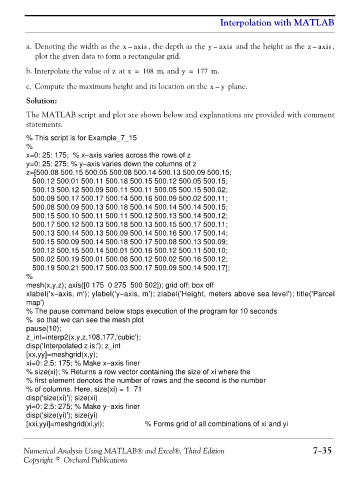
                a. Denoting the width as the x –  axis , the depth as the y –  axis  and the height as the z –  axis ,
                   plot the given data to form a rectangular grid.

                b. Interpolate the value of   at x =  108  m, and y =  177  m.
                                          z
                c. Compute the maximum height and its location on the x –  y   plane.
                Solution:

                The MATLAB script and plot are shown below and explanations are provided with comment
                statements.


                % This script is for Example_7_15
                %
                x=0: 25: 175;  % x−axis varies across the rows of z
                y=0: 25: 275; % y−axis varies down the columns of z
                z=[500.08 500.15 500.05 500.08 500.14 500.13 500.09 500.15;
                   500.12 500.01 500.11 500.18 500.15 500.12 500.05 500.15;
                   500.13 500.12 500.09 500.11 500.11 500.05 500.15 500.02;
                   500.09 500.17 500.17 500.14 500.16 500.09 500.02 500.11;
                   500.08 500.09 500.13 500.18 500.14 500.14 500.14 500.15;
                   500.15 500.10 500.11 500.11 500.12 500.13 500.14 500.12;
                   500.17 500.12 500.13 500.18 500.13 500.15 500.17 500.11;
                   500.13 500.14 500.13 500.09 500.14 500.16 500.17 500.14;
                   500.15 500.09 500.14 500.18 500.17 500.08 500.13 500.09;
                   500.12 500.15 500.14 500.01 500.16 500.12 500.11 500.10;
                   500.02 500.19 500.01 500.08 500.12 500.02 500.16 500.12;
                   500.19 500.21 500.17 500.03 500.17 500.09 500.14 500.17];
                %
                mesh(x,y,z); axis([0 175  0 275  500 502]); grid off; box off
                xlabel('x−axis, m'); ylabel('y−axis, m'); zlabel('Height, meters above sea level'); title('Parcel
                map')
                % The pause command below stops execution of the program for 10 seconds
                %  so that we can see the mesh plot
                pause(10);
                z_int=interp2(x,y,z,108,177,'cubic');
                disp('Interpolated z is:'); z_int
                [xx,yy]=meshgrid(x,y);
                xi=0: 2.5: 175; % Make x−axis finer
                % size(xi); % Returns a row vector containing the size of xi where the
                % first element denotes the number of rows and the second is the number
                % of columns. Here, size(xi) = 1  71
                disp('size(xi)'); size(xi)
                yi=0: 2.5: 275; % Make y−axis finer
                disp('size(yi)'); size(yi)
                [xxi,yyi]=meshgrid(xi,yi);          % Forms grid of all combinations of xi and yi


               Numerical Analysis Using MATLAB® and Excel®, Third Edition                             7−35
               Copyright © Orchard Publications

