


Page 311 - Numerical Analysis Using MATLAB and Excel
P. 311
Interpolation with MATLAB


                title('Plot for the Three−dimensional sin(R) / R Function')
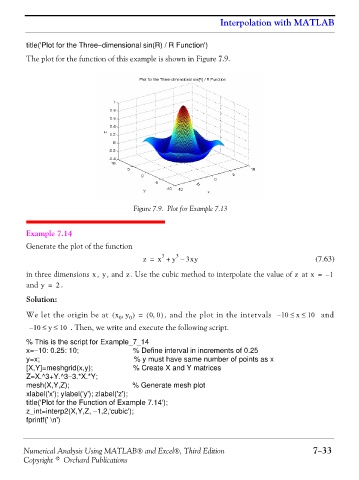
                The plot for the function of this example is shown in Figure 7.9.


                                                Figure 7.9. Plot for Example 7.13


                Example 7.14

                Generate the plot of the function
                                                         3
                                                             3
                                                   z =  x +  y – 3xy                                   (7.63)
                                              z
                                    xy
                                                                                                 z
                in three dimensions  , , and  . Use the cubic method to interpolate the value of   at x =  – 1
                and y =    . 2
                Solution:

                                                      ,
                We let the origin be at  x y,(  0  0 )  ( =  00 )  , and the plot in the intervals  – 10 ≤  x ≤  10   and
                 – 10 ≤  y ≤  10  . Then, we write and execute the following script.


                % This is the script for Example_7_14
                x=−10: 0.25: 10;                % Define interval in increments of 0.25
                y=x;                            % y must have same number of points as x
                [X,Y]=meshgrid(x,y);            % Create X and Y matrices
                Z=X.^3+Y.^3−3.*X.*Y;
                mesh(X,Y,Z);                    % Generate mesh plot
                xlabel('x'); ylabel('y'); zlabel('z');
                title('Plot for the Function of Example 7.14');
                z_int=interp2(X,Y,Z, −1,2,'cubic');
                fprintf(' \n')


               Numerical Analysis Using MATLAB® and Excel®, Third Edition                             7−33
               Copyright © Orchard Publications

