


Page 175 - Basics of MATLAB and Beyond
P. 175
xt = [0 1 .5];
                               yt=[00     1];
                               zt=[00     1];
                               clf
                                                             1
                               patch(xt,yt,zt,’y’)
                                                             0.5
                                                             z
                               view(3)
                                                             0
                               box                           1             1
                                                               0.5
                                                                       0.5
                               xyz                              y  0  0  x
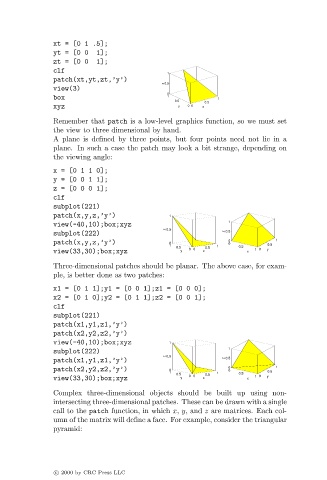
                               Remember that patch is a low-level graphics function, so we must set
                               the view to three dimensional by hand.
                               A plane is defined by three points, but four points need not lie in a
                               plane. In such a case the patch may look a bit strange, depending on
                               the viewing angle:
                               x=[0110];
                               y=[0011];
                               z=[0001];
                               clf
                               subplot(221)
                               patch(x,y,z,’y’)               1
                                                                              1
                               view(-40,10);box;xyz
                                                             z  0.5
                               subplot(222)                                  z  0.5
                               patch(x,y,z,’y’)               0               0 0         1
                                                              1            1    0.5     0.5
                                                                0.5  0  0.5
                               view(33,30);box;xyz               y  0  x           x  1 0  y
                               Three-dimensional patches should be planar. The above case, for exam-
                               ple, is better done as two patches:
                               x1 = [0 1 1];y1 = [0 0 1];z1 = [0 0 0];
                               x2 = [0 1 0];y2 = [0 1 1];z2 = [0 0 1];
                               clf
                               subplot(221)
                               patch(x1,y1,z1,’y’)
                               patch(x2,y2,z2,’y’)
                               view(-40,10);box;xyz           1
                               subplot(222)                                   1
                                                             z  0.5
                               patch(x1,y1,z1,’y’)                           z  0.5
                               patch(x2,y2,z2,’y’)            0               0 0         1
                                                              1  0.5    0.5  1  0.5     0.5
                               view(33,30);box;xyz               y  0  0  x        x  1 0  y
                               Complex three-dimensional objects should be built up using non-
                               intersecting three-dimensional patches. These can be drawn with a single
                               call to the patch function, in which x, y, and z are matrices. Each col-
                               umn of the matrix will define a face. For example, consider the triangular
                               pyramid:


                               c   2000 by CRC Press LLC

