


Page 180 - Basics of MATLAB and Beyond
P. 180
t = linspace(0,2*pi,20);
                               x = cos(t);
                               y=t;
                               z = sin(t);
                               We will use the vertex-and-faces method of specifying the patch. The
                               vertex and face matrices are
                               v = [x’ y’ z’];
                               f = 1:20;
                               We need a colormap of length 20 to colour our 20 data points:
                               fvc = summer(20);
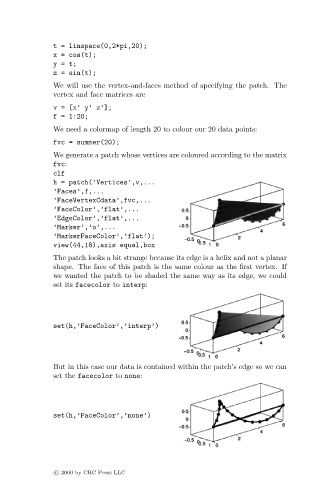
                               We generate a patch whose vertices are coloured according to the matrix
                               fvc:
                               clf
                               h = patch(’Vertices’,v,...
                               ’Faces’,f,...
                               ’FaceVertexCdata’,fvc,...
                               ’FaceColor’,’flat’,...
                               ’EdgeColor’,’flat’,...
                               ’Marker’,’o’,...
                               ’MarkerFaceColor’,’flat’);
                               view(44,18),axis equal,box
                               The patch looks a bit strange because its edge is a helix and not a planar
                               shape. The face of this patch is the same colour as the first vertex. If
                               we wanted the patch to be shaded the same way as its edge, we could
                               set its facecolor to interp:


                               set(h,’FaceColor’,’interp’)


                               But in this case our data is contained within the patch’s edge so we can
                               set the facecolor to none:


                               set(h,’FaceColor’,’none’)


                               c   2000 by CRC Press LLC

