


Page 184 - Basics of MATLAB and Beyond
P. 184
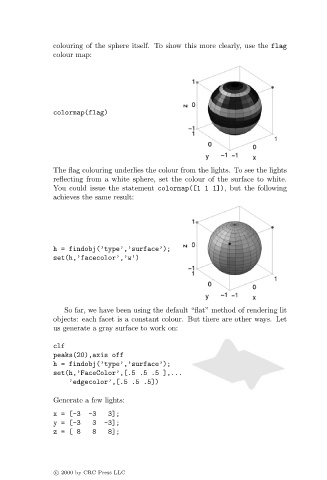
colouring of the sphere itself. To show this more clearly, use the flag
                               colour map:


                               colormap(flag)


                               The flag colouring underlies the colour from the lights. To see the lights
                               reflecting from a white sphere, set the colour of the surface to white.
                               You could issue the statement colormap([1 1 1]), but the following
                               achieves the same result:


                               h = findobj(’type’,’surface’);
                               set(h,’facecolor’,’w’)


                                  So far, we have been using the default “flat” method of rendering lit
                               objects: each facet is a constant colour. But there are other ways. Let
                               us generate a gray surface to work on:

                               clf
                               peaks(20),axis off
                               h = findobj(’type’,’surface’);
                               set(h,’FaceColor’,[.5 .5 .5 ],...
                                   ’edgecolor’,[.5 .5 .5])

                               Generate a few lights:
                               x = [-3-3      3];
                               y = [-33      -3];
                               z=[8      8    8];


                               c   2000 by CRC Press LLC

