Page 179 - Basics of MATLAB and Beyond
P. 179
MarkerEdgeColor The colour of the marker, or the edge colour for filled
                                    markers.

                               MarkerFaceColor The fill colour for markers that are closed shapes.
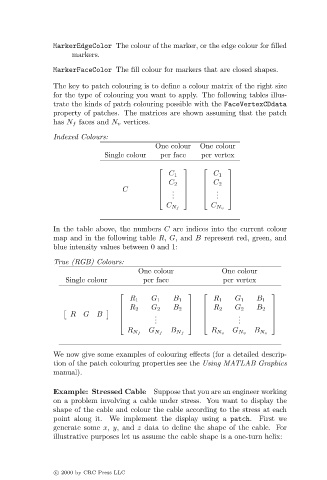
                               The key to patch colouring is to define a colour matrix of the right size
                               for the type of colouring you want to apply. The following tables illus-
                               trate the kinds of patch colouring possible with the FaceVertexCDdata
                               property of patches. The matrices are shown assuming that the patch
                               has N f faces and N v vertices.

                               Indexed Colours:
                                                          One colour  One colour
                                             Single colour  per face  per vertex

                                                                           
                                                              C 1         C 1
                                                              C 2         C 2
                                                                           
                                                 C            .         .  
                                                               .         .  
                                                           
                                                              .         .  
                                                             C N f       C N v
                               In the table above, the numbers C are indices into the current colour
                               map and in the following table R, G, and B represent red, green, and
                               blue intensity values between 0 and 1:

                               True (RGB) Colours:
                                                      One colour            One colour
                                  Single colour        per face             per vertex

                                                                                      
                                                   R 1   G 1   B 1        R 1   G 1  B 1
                                                  R 2   G 2   B 2      R 2   G 2  B 2  

                                   R   G   B             .                   .        
                                                          .                     .
                                                                                      
                                                         .                   .        
                                                   R N f  G N f  B N f   R N v  G N v  B N v
                               We now give some examples of colouring effects (for a detailed descrip-
                               tion of the patch colouring properties see the Using MATLAB Graphics
                               manual).

                               Example: Stressed Cable Suppose that you are an engineer working
                               on a problem involving a cable under stress. You want to display the
                               shape of the cable and colour the cable according to the stress at each
                               point along it. We implement the display using a patch. First we
                               generate some x, y, and z data to define the shape of the cable. For
                               illustrative purposes let us assume the cable shape is a one-turn helix:


                               c   2000 by CRC Press LLC
   174   175   176   177   178   179   180   181   182   183   184