


Page 176 - Basics of MATLAB and Beyond
P. 176
x=[0 0 .5 0
.5 .5 1 1
1 .5 .5 .5];
y=[0 0 1 0
1 1 0 0
0 .5 .5 .5];
z=[0 0 0 0
0 0 0 0 1
0 1 1 1];
z 0.5
clf
h = patch(x,y,z,’y’) 0 1
1
view(3);box;xyz 0.5 0.5
y 0 0 x
Exercise 21 Define x, y, and z matrices to draw a truncated
square pyramid (answer on page 192):
1
patch(x,y,z,’y’) z 0.5
view(3);box;xyz
0
1
1
0.5
0.5
y 0 0 x
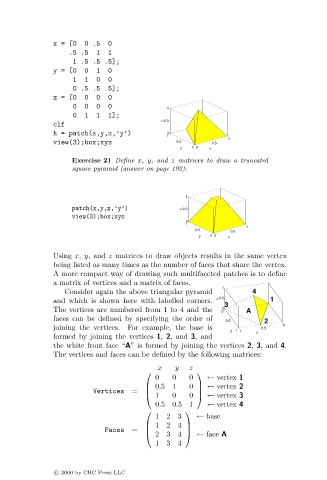
Using x, y, and z matrices to draw objects results in the same vertex
being listed as many times as the number of faces that share the vertex.
A more compact way of drawing such multifaceted patches is to define
a matrix of vertices and a matrix of faces.
1
Consider again the above triangular pyramid 4
and which is shown here with labelled corners. 0.5 1
z
3
The vertices are numbered from 1 to 4 and the 0 0 A
faces can be defined by specifying the order of 0.5 2
joining the vertices. For example, the base is 0.5 0
y 1 1 x
formed by joining the vertices 1, 2, and 3, and
the white front face “A” is formed by joining the vertices 2, 3, and 4.
The vertices and faces can be defined by the following matrices:
x y z
0 0 0 ← vertex 1
0.51 0 ← vertex 2
Vertices =
1 0 0 ← vertex 3
0.50.51 ← vertex 4
1 2 3 ← base
1 2 4
Faces =
2 3 4 ← face A
1 3 4
c 2000 by CRC Press LLC

